Looking for a practical way to extend wired or wireless internet through your home using existing electrical wiring? Powerline WiFi adapters are designed to turn outlets into network access points, making them ideal for homes with thick walls, multi-story layouts, basements, or garages where traditional Wi‑Fi struggles. The top picks below suit different needs: compact kits for quick setup, high‑speed AV2/AV3 options for streaming and gaming, and dual‑band extenders that blend wired and wireless connectivity. This guide highlights five solid choices and explains who should choose each one.
Summary table of selected products
| Product | Best For | Key Speed (Approx.) |
|---|---|---|
| TP-Link TL-WPA7617 KIT | Multi-story homes needing both wired and Wi‑Fi reach | AV1000 + AC1200 Wi‑Fi |
| TP-Link TL-PA7017 KIT | Simple AV1000 wired extension | AV1000 |
| TP-Link TL-WPA7817 KIT | Wi‑Fi 6 capability with powerline | AV1000 + AX1500 |
| TP-Link TL-PA9020P KIT | Two Gigabit ports with passthrough | AV2000 |
| NETGEAR PLP2000 Kit | High-speed, two‑port wired with passthrough | 2000 Mbps, Powerline |
TP-Link Powerline WiFi Extender TL-WPA7617 KIT
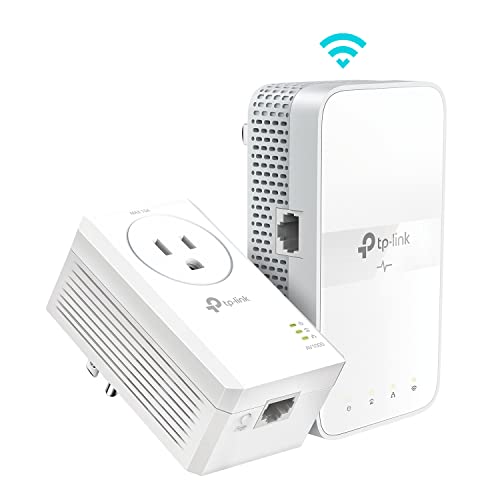
This kit combines an AV1000 powerline adapter with an AC1200 dual‑band Wi‑Fi extender, plus a Gigabit Ethernet port and passthrough. It is best for households where routers can’t reach certain rooms, like basements or far corners. The HomePlug AV2 technology supports speeds up to the plan limit, while the two‑band Wi‑Fi helps support HD streaming and moderate gaming. Choose this if you need both wired and wireless expansion in a larger space and want plug‑and‑play setup.
- Best for multi‑level homes where walls or distance block signals.
- Powerline speeds advertised as AV1000 with practical performance tied to your internet plan.
- Limitations include potential speed reductions on long runs or poor electrical circuits.
TP-Link AV1000 Powerline Ethernet Adapter KIT TL-PA7017 KIT

This kit emphasizes extendable Ethernet connections through existing wiring. It uses AV1000 powerline speeds and claims compatibility across compatible TP-Link adapters, which is convenient for expanding a wired network across a multi‑story home. It’s best for users who primarily need stable wired connectivity in remote rooms, with the adage “pair and play” guiding setup. A short caveat is that performance depends on electrical circuit quality and distance.
- Better for users prioritizing wired steadiness over wireless range.
- Notable caveat: performance varies with electrical circuit quality.
TP-Link Powerline Wi‑Fi 6 Extender TL-WPA7817 KIT

This kit brings Wi‑Fi 6 (AX) alongside AV1000 Powerline, offering stronger throughput and better efficiency in dense networks. It’s best for homes with many devices or users who stream 4K video and play online games simultaneously. The set includes two adapters to form a secure Powerline network, with easy pairing. A limitation to consider is that the full AX benefits depend on compatible devices and favorable electrical conditions.
- Best for households with multiple smart devices and higher Wi‑Fi demands.
- Choose this if you want better performance in congested networks.
TP-Link AV2000 Powerline Ethernet Adapter TL-PA9020P KIT

This kit offers AV2000 speeds with two Gigabit Ethernet ports and passthrough. It suits larger homes with high bandwidth needs, such as 4K streaming, gaming, and home offices. It’s best for users who want to connect multiple devices at high speed over Powerline. A potential limitation is that performance can vary based on circuit layout and presence of surge protectors, which might disrupt the link.
- Best for high‑speed wired needs and multiple devices.
- Avoid if the electrical circuit is unusually long or includes surge protection that could block connectivity.
NETGEAR Powerline Adapter Kit PLP2000
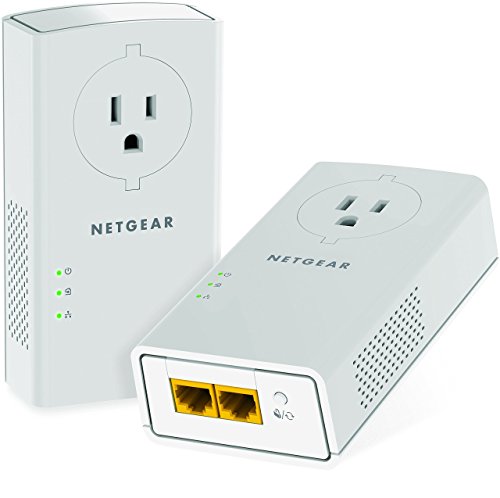
The NETGEAR PLP2000 kit emphasizes high speeds with two Gigabit Ethernet ports and a passthrough outlet. It’s a solid choice for users who need fast, reliable wired connections and wish to extend coverage to rooms that would otherwise lack stable connectivity. The key caution is that real‑world speeds depend on electrical wiring quality and circuit constraints, especially on longer runs.
- Best for high‑performance wired expansion with multiple devices.
- Be mindful of potential reductions in speed due to wiring quality and distance.
TP-Link AV1000 Powerline Kit TL-PA7017P KIT

This kit provides pass‑through capability and AV1000 speeds, ideal for adding reliable wired connections without sacrificing a wall outlet. It’s best for users who want to keep outlets free for other devices while extending network reach. A potential limitation is that performance can drop on longer routes or in circuits with interference.
- Good compromise between outlet availability and wired speed.
- Avoid if you require a large number of high‑bandwidth devices on a single pair.
Buying Guide: How To Choose A Powerline WiFi Adapter
What connectivity do you actually need? If your priority is simple wired expansion, look for AV2/AV1000 and a kit that supports two adapters. For households with several devices or streaming in multiple rooms, prioritize higher speeds and dual‑band or Wi‑Fi 6 options. Consider the electrical environment: older homes or long wiring runs can reduce theoretical speeds. Passthrough outlets help keep power access available in busy rooms, while distance between adapters matters. If you want a mixed wired/wireless solution, choose a setup with a strong Wi‑Fi extender integrated into the Powerline kit.
Important questions to guide your buying decisions:
- Do I need a strong wireless signal in addition to wired connections? Look for kits with dual‑band or Wi‑Fi 6 support.
- Is passthrough on outlets required for the room where the adapter is installed?
- How many devices will rely on Powerline connectivity simultaneously?
- Is the installation on a single circuit or multiple circuits in the home?
- What is the maximum distance between adapters in my home layout?
Key Buyer’s Considerations
- Compatibility: AV2/HomePlug standards determine cross‑brand compatibility. Some TP‑Link kits work well with other TP‑Link powerline devices.
- Security: Look for WPA2/WPA3 support and easy pairing to keep networks secure.
- Setup simplicity: Plug‑and‑play kits reduce setup time and technical steps.
- Future needs: If you anticipate more devices or higher bandwidth demands, consider Wi‑Fi 6 or AX options.
FAQ
- Do powerline adapters require a direct outlet? Yes, direct outlets provide better performance than surge protectors or power strips.
- Can I mix brands? Some brands are compatible via HomePlug AV2, but performance may vary. Check compatibility notes.
- Will these replace my router? They extend connectivity but do not replace the main router; they work alongside it.
- Is Wi‑Fi 6 faster than Wi‑Fi 5 in powerline kits? Yes, Wi‑Fi 6 offers better efficiency and capacity in busy networks.
- What affects speed the most? Electrical circuit quality, distance between adapters, and interference from electrical appliances.
- Are two adapters required? For most setups, yes; two adapters are needed to form a Powerline network.