Finding the right printer and cutting setup for vinyl sticker projects depends on whether you prioritize built-in cutting, high-resolution prints, or simple paper sheets. This guide highlights five strong options that balance print quality, cutting capability, and paper availability. Best for crafters who want an all-in-one device, best for those who need value-packed bundles, and best for those who cut and print on various media. The selections include all-in-one sticker printers and reliable printable vinyl papers for inkjet or laser printers.
| Product | Type | Best For |
|---|---|---|
| Liene PixCut S1 Color Sticker Printer & Cutting Machine | All-in-one sticker printer & cutter | Creators seeking AI-driven print-and-cut in one device |
| Liene PixCut S1 Inspire Kit | All-in-one with paper bundle | Those who want a large starter supply of media |
| Likcut S41 Vinyl Cutter Machine | Vinyl cutter with print-then-cut | Users needing precise vinyl cuts and flexible connections |
| Premium Printable Vinyl Sticker Paper (Small Smile) | Printable vinyl sheets for inkjet/laser | DIY label makers who print on standard printers |
| Phomemo Bluetooth Thermal Label Printer | Thermal label printer | Small business shipments with wireless or USB options |
Liene PixCut S1 Color Sticker Printer & Cutting Machine

The PixCut S1 integrates high-resolution color printing with precise die-cutting, enabling print-and-cut workflows in a single device. This makes it ideal for hobbyists who want quick turnaround on custom stickers and gifts. The AI-driven image extraction and cutting ensure edges align with subjects for clean, professional results. Best for para-creative projects where time savings and convenience matter most.
Who it’s best for: crafters who want an all-in-one machine and enjoy designing from a smartphone app. Why selected: it streamlines the entire process from capture to finished sticker in minutes. Caution: the compact design may limit larger-format projects compared to standalone printers or cutters.
Liene PixCut S1 Inspire Kit

The Inspire Kit expands the PixCut S1 experience with a plentiful supply of 36 photo papers and 144 sticker papers, allowing for longer creative runs without reordering media. It preserves the same AI-assisted image extraction and precise cutting as the base model, enabling consistent, edge-to-edge results. Best for avid crafters who want a ready-to-use bundle for frequent sticker production.
Who it’s best for: fabricators who want a robust media library and immediate printing options. Why selected: the large media bundle reduces interruptions in ongoing projects. Caution: the kit adds cost upfront and requires space for multiple paper types.
Likcut S41 Vinyl Cutter Machine
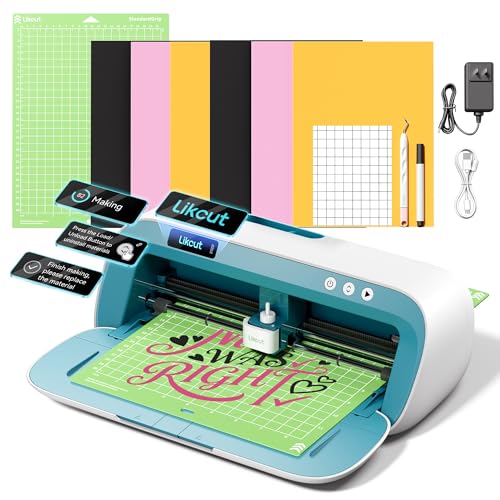
LIKcut’s S41 emphasizes a streamlined 3-step workflow with dual-mode connectivity, ensuring smoother operation whether you’re wired or wireless. The micro-precision control delivers a tight edge tolerance of 0.2 mm, which is helpful for intricate designs on vinyl, cardstock, or HTV. Best for users who need reliable cutting accuracy and flexible connection options.
Who it’s best for: crafters who work with various media and want dependable cutting performance. Why selected: the strong precision and simple app-driven workflow reduce latency and errors. Caution: as a cutter-first system, printing may rely on separate devices for full-color projects.
Premium Printable Vinyl Sticker Paper (Small Smile)

This printable vinyl paper suits inkjet and laser printers, delivering bright colors and robust durability. It is designed for easy cutting with scissors or cutting machines like Silhouette. The paper is water-resistant after drying, with a recommendation to laminate for outdoor use. Best for hobbyists who want high-visibility labels with standard home printers.
Who it’s best for: DIY labels and small run stickers printed on common office printers. Why selected: it provides strong color rendering and versatility across cutting methods. Caution: long-term outdoor durability may require additional lamination or sealing for extreme exposure.
Phomemo Bluetooth Thermal Label Printer

The Phomemo 241BT is a compact, wireless option for shipping labels and small business paperwork. It supports mobile apps and Bluetooth pairing for iOS and Android, plus USB connectivity for PC or Mac. Best for users who need label printing on a variety of media widths from 1 to 4.6 inches. Note: color printing is not supported with standard thermal papers.
Who it’s best for: small warehouses or home-based sellers who prefer wireless label creation. Why selected: flexible connectivity and broad compatibility with shipping platforms. Caution: color labels require specialized label material; standard black-and-white is the norm here.
Buying Guide: Key Purchase Considerations
- All-in-one vs. separate printer and cutter: If you want a compact, streamlined workflow, an all-in-one like the Liene PixCut S1 is ideal. If you already own a cutter or printer, consider separate devices to maximize media flexibility.
- Media compatibility: For vibrant stickers, choose printers that support dye-sublimation or high-resolution inkjet printing. For cost-effective runs, ensure you have access to suitable printable vinyl papers or sheets.
- Cutting precision: For detailed designs, look for micro-precision controls (like 0.2 mm tolerance) and AI-assisted edge following to prevent miscuts.
- Connectivity: If you plan to design on a mobile device, ensure Bluetooth and app support. For multi-device workspaces, wired and USB options can reduce workflow gaps.
- Durability and environment: Outdoors or product labels may require waterproof or lamination-ready materials. Consider media with water resistance and the option to seal or coat for extra longevity.
Frequently Asked Questions
- What is a print-and-cut device? A device that can print full-color images and then automatically cut around the printed shapes, streamlining sticker production.
- Do printable vinyl papers work with laser printers? Yes, many are designed to work with both inkjet and laser printers, but check the product specs for compatibility.
- Is AI image extraction necessary for good results? It helps align cuts to subjects, but manual adjustment is still possible in most apps if needed.
- What media size should I buy? 8.5 x 11 inches is common for sticker papers; check your printer’s supported width and the cutter’s capabilities.
- Can I use these devices for outdoor labels? Waterproof vinyl and protective coatings improve outdoor longevity; laminating or sealing is often recommended for extended exposure.
- Do these devices require professional setup? Most listed products offer straightforward app-based setup and consumer-friendly guides for at-home use.