When a reliable rear view camera is needed for a van, the goal is clear: safer reversing with minimal setup time and dependable image quality. The following selections are chosen for van owners who want straightforward installation, solid signal reliability, and good night vision. Each option suits different needs, from quick plug-and-play installs to high-end mirror displays with GPS and Wi‑Fi. Below, find practical comparisons, who each product is best for, and buying guidance to help you pick the right system for your van.
Summary table of chosen products
| Product | Best For | Key Benefit | Limitations |
|---|---|---|---|
| LeeKooLuu 15-Minute Easy to Install Backup Camera | Quick installs, budget-friendly | 15-minute plug-and-play, HD 1080p | Wired kit; may require cigarette lighter power |
| WOLFBOX G840S 12″ 4K Mirror Dash Cam | Large display, GPS tracking | 4K front, 1080p rear, real-time viewing via app | Higher complexity, depends on Wi‑Fi |
| Pemacom 1080P Wireless Backup Camera | Magnetic, wireless flexibility | Strong signal, night vision, up to 33 ft range | Wireless signal can vary by environment |
| WOLFBOX G930 10″ 4K Mirror Camera | Balanced features, ease of use | 4K front, 1080P rear, 5.8GHz WiFi | Smaller screen than other mirrors |
| Yakry RV Backup Camera Plug and Play | RV/van users needing reliable wired setup | Easy 8-minute install, stable wired signal | Wired, not wireless |
LeeKooLuu 15-Minute Backup Camera Kit

Best for quick vans upgrades. This kit emphasizes fast installation with a simple two-step setup and a plug-and-play power source. It delivers HD 1080p color images and claims stable signal transmission, reducing delays or interference. The housing uses rugged materials and nano-coating to withstand weather. This option is ideal for owners who want a budget-friendly wired solution that’s ready in minutes, not hours, though it relies on a 12-volt power source and may require a reverse-light trigger for automatic activation.
Who it’s best for: Van owners seeking an affordable, straightforward wired backup camera that’s quick to install and provides clear daytime and night images.
Why it was selected: Combines fast setup with reliable signal transmission and all-weather performance, which is essential for vehicles exposed to variable weather conditions.
Caution / Limitation: Wired connections may require some routing under dash panels; ensure clearance for the 4-pin video power cable and power plug to avoid cable wear.
WOLFBOX G840S 12″ 4K Mirror Dash Cam

Best for drivers who want a large, integrated display with GPS and real-time mobile access. The G840S offers front 4K and rear 1080p recording, with a 12″ screen that reduces blind spots while driving and reversing. Wi‑Fi connectivity and GPS tracking enable real-time data display on the dash and easy video access via the WOLFBOX app. The model supports a smart split-screen view and a curved screen that blends with interior styling. This is a solid choice for van owners who value high-resolution footage and easy sharing of clips.
Who it’s best for: Van owners who want a high-resolution front camera, GPS-backed data, and a large, user-friendly display for day-to-day driving plus reversing.
Why it was selected: Combines 4K front with a broad display and convenient app-based controls for monitoring and sharing footage, suited to fleet or family use.
Caution / Limitation: Higher data usage and more complex setup may require some familiarity with app pairing and Wi‑Fi connections.
Pemacom 1080P Wireless Backup Camera

Best for flexible mounting and minimal wiring. This wireless backup camera uses a magnetic base that attaches to a metal surface and provides up to 33 feet of signal transmission. It features night vision and a 1080p color image with a robust digital signal and frequency hopping to reduce interference. The magnetic base is coated for paint protection, making it a good option for renters or frequent movers who want simple, tool-free installation.
Who it’s best for: Van or RV owners who want a portable, magnet-based wireless system with reliable night vision and easy mounting options.
Why it was selected: It’s a practical choice when you want flexible placement without running long power cables through the vehicle interior.
Caution / Limitation: Wireless performance can vary by vehicle environment and metal surroundings; ensure a clear line-of-sight path when possible.
WOLFBOX G930 10″ 4K Mirror Camera
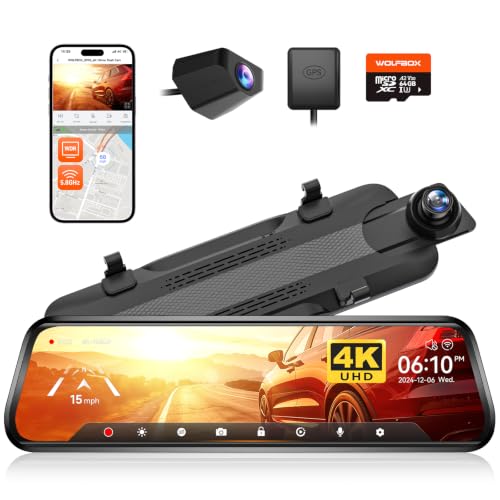
Best for balanced performance with a mid-sized display. The G930 provides a 4K front camera and 1080p rear, with 5.8GHz WiFi for stable connectivity. It supports split-screen viewing and app-based access for downloads and sharing. The 10″ screen offers a more compact footprint than a full 12″ unit while still delivering strong visibility and image quality, which helps with daily driving and reversing in a van or larger SUV.
Who it’s best for: Van owners wanting high-quality front footage, good rear visibility, and convenient app integration without a very large display.
Why it was selected: Provides a high-resolution front view with reliable wireless features and user-friendly control.
Caution / Limitation: A smaller screen than the G840S might limit quick overhead checks in tight spaces.
Yakry RV Backup Camera Plug and Play

Best for RV-friendly, straightforward wired installation. The system promises an 8-minute setup with a single power source connection and a direct camera-to-monitor link. It emphasizes stable transmission and a wide 150° viewing angle with true night vision. This is a practical choice for vans used for travel or work where reliable, continuous feed is essential for backing into tight spaces or busy loading areas.
Who it’s best for: Van fleets or RV owners who prioritize a simple, reliable wired installation with wide coverage and night visibility.
Why it was selected: The quick setup and robust wired connection help minimize delays and installation hassle in busy or shared vehicle environments.
Caution / Limitation: Being wired, it requires cable routing; ensure proper protection to avoid wear over time.
Buying Guide: Key Considerations For Choosing A Rear View Camera For Van
- Choose wired for reliability and zero lag, or wireless for flexible mounting. Some vans benefit from plug-and-play power supplies that simplify setup.
- Larger screens reduce blind spots, but may demand more dash space. Consider 4K front or rear for clear footage, and night vision capability for low-light reversing.
- A wide-angle lens (120°–170°) helps minimize blind zones during backing. Check for distortion-free 150° or 170° options.
- WiFi-enabled units often allow app-based viewing, sharing, and playback. Ensure compatibility with your phone and OS.
- Look for IP ratings (IP69K preferred) and rugged housings for exposure to rain, dust, and temperature swings.
- Verify power requirements and wiring paths. Some kits use cigarette lighter power; others connect to reverse lights or a fused 12V supply.
- Quick install and basic needs vs. feature-rich options with GPS, dual cams, and large displays.
Frequently Asked Questions
- What’s the easiest rear view camera for a van to install? Plug-and-play wired kits with a cigarette lighter power supply are typically the easiest for quick upgrades.
- Should I choose a wireless or wired system for a van? Wireless can be easier to install but may suffer from interference; wired systems offer zero-latency video and stable transmission.
- Do rear view cameras include night vision? Most models include night vision or LEDs to improve visibility in low light conditions.
- Is a larger display better for backing up? A larger display can help, but ensure it fits your cabin layout and doesn’t distract while driving.
- Do I need GPS in a rear view camera? GPS is optional but helpful for logging location data and real-time tracking via paired apps.
- What should I check before buying? Confirm resolution, field of view, weather rating, and whether the system is compatible with your van’s power and mounting options.