Find the right scan tool with ECU programming for professional diagnostics and in-house coding. This guide targets technicians and shop owners who need bidirectional control, ECU coding, and reliable data mapping. Top picks below are selected for varying needs—from dealer-level coding to budget-friendly wireless options. The following table highlights each product’s focus to help you compare at a glance.
| Product | Best For | Key Benefit |
|---|---|---|
| TOPDON ONE Bidirectional Scan Tool | Shop technicians needing fast wireless access | 10.1″ touchscreen, J2534 pass-thru, topology mapping |
| TOPDON ArtiDiag Pro | Techs requiring extensive ECU coding | 35+ services, robust coding, broad model support |
| TOPDON ONE Plus OBD2 Scanner | In-house coding with updates | 2 years updates, ECU programming & topology mapping |
| LAUNCH X431 CRP919XBT | Wireless, all-system capability | CAN FD, DOIP, FCA AutoAuth, 2D display |
| THINKCAR THINKSCAN 689BT | Value-focused, broad functions | 34 services, bi-directional control, no subscription |
TOPDON ONE Bidirectional Scan Tool

The TOPDON ONE is a 10.1-inch professional diagnostic tablet that supports bidirectional control and J2534 pass-through. The large touchscreen enables fast navigation for real-time data visualization. This tool is best for shops needing dealer-like capabilities without multiple factory tools, thanks to TOPDON’s RLink platform and OE topology mapping. It visualizes the ECU network, enabling precise pinpointing of faults with zoom and pan features. This model is ideal for technicians who require quick pass-through coding and reliable module communication.
- Best for: shops that value fast, wireless diagnostics and network-wide ECU mapping.
- Why chosen: integrated topology mapping and J2534 pass-thru extend in-house capabilities.
- Caution: top-end features depend on compatible OEM software; verify any required subscriptions.
TOPDON ArtiDiag Pro Bidirectional Scan Tool

The ArtiDiag Pro focuses on ECU coding with bidirectional control across a wide vehicle range. It offers 35+ services to resolve common maintenance tasks, including oil reset, EPB, and steering angle resets. With strong compatibility for VW/AUDI, SKODA, SEAT, BENZ, and other major brands, it’s aimed at technicians who need deeper coding capabilities and targeted actuator testing. This model is best for shops that perform frequent coding and feature deactivation or activation within modern ECUs.
- Best for: technicians needing robust ECU coding and targeted actuator testing.
- Why chosen: broad coverage of services and strong coding capabilities.
- Caution: coding features may vary by model and year; ensure vehicle compatibility before coding.
TOPDON ONE Plus OBD2 Scanner

The ONE Plus combines ECU programming and coding with advanced diagnostics and topology mapping. It includes 2 years of free software updates and supports DoIP, CAN FD, and J2534 Pass-Thru. The device is designed for professional shops that require OE-level diagnostics and coding across multiple brands. It’s especially suitable for facilities expanding in-house repair capabilities and needing rapid software updates for new models.
- Best for: shops seeking an all-in-one diagnostic with ongoing updates.
- Why chosen: extended update window and broad protocol support for modern vehicles.
- Caution: coding depth varies by vehicle; confirm target models before coding.
LAUNCH X431 CRP919EBT
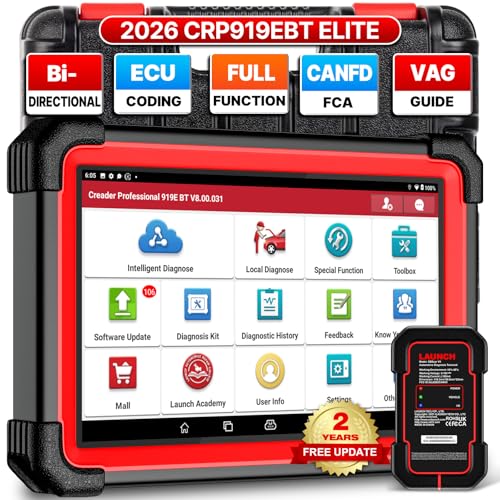
The CRP919EBT is a 2026 upgrade offering wireless OBD2 diagnostics with CAN FD and DoIP support, plus FCA AutoAuth. It features a robust 7-inch touchscreen and the latest DBSCAR VII 2-in-1 connector for flexible connectivity. Ideal for shops needing broad protocol coverage and the ability to diagnose post-2020 vehicles, especially those from FCA groups. This tool emphasizes dealer-like ECU coding and adaptation capabilities with a strong emphasis on ease of use in field and shop settings.
- Best for: technicians needing CAN FD, DoIP, and FCA AutoAuth in one package.
- Why chosen: wireless convenience with comprehensive protocol support.
- Caution: AutoAuth features may require separate setup or accounts for some brands.
THINKCAR THINKSCAN 689BT

The THINKSCAN 689BT offers full bi-directional control, ECU coding, and 34+ services with CAN FD and DoIP. It includes wireless updates with no ongoing subscription and promises broad vehicle coverage, making it a strong value choice for shops prioritizing feature depth and cost efficiency. It is best for users who want a wide feature set without monthly fees, while acknowledging that FCA AutoAuth may require additional access steps or accounts.
- Best for: budget-conscious shops needing broad functions and no subscription fees.
- Why chosen: strong feature set at a competitive price point.
- Caution: FCA AutoAuth access may require a separate account or purchase beyond basic tools.
Buying Guide
What features matter most for ECU programming?
Look for bidirectional control, ECU coding, and offline programming capabilities. Ensure the tool supports the brands you service most and offers reliable topology mapping to visualize module networks.
How important is wireless connectivity?
Wireless (Wi‑Fi or cellular) can boost workflow efficiency and reduce cable clutter. Verify the tool offers stable connections with a fast VCI and adequate memory to handle large software updates.
What about updates and software coverage?
Two years of updates or more are advantageous for keeping coverage current with new models. Confirm the update policy and whether updates are automatic or require manual downloads.
Brand and ecosystem considerations
Choose brands that provide dealer-level capabilities and robust support for the vehicle brands you service. An open platform (RLink, PMI, or similar) can expand in-house capabilities without extra tool purchases.
Practical usage tips
- Verify vehicle compatibility before coding or programming to prevent errors.
- Back up ECU data prior to coding or adaptation procedures.
- Use topology mapping to identify the exact module involved in a fault for quicker repairs.
FAQ
- What is ECU coding and why does it matter?
ECU coding customizes or enables features in a vehicle’s control modules, allowing updates or activations that improve performance or restore functions.
- Do I need an internet connection for all coding tasks?
Some tasks can be performed offline (offline programming), while others require online access for OEM data and updates.
- Can I use these tools on multiple car brands?
- Are there safety considerations when coding ECUs?
Yes. Always ensure the battery is fully charged, back up data, and avoid coding during critical vehicle configurations to prevent bricking modules.
- What is pass-thru (J2534) support used for?
Pass-thru lets the tool interface directly with OEM diagnostic software, enabling dealer-level access and advanced coding tasks.
Most tools listed support multiple major brands, but always verify model-year compatibility and brand-specific coding limitations.