Looking for a reliable smart light switch that fits your needs and wiring setup? This guide highlights top picks for single-pole installations that work with Alexa, Google Assistant, and more. It explains who each switch is best for, plus practical cautions and setup tips. Whether you’re upgrading a single room or outfitting multiple circuits, you’ll find options tailored to neutral-wire requirements, app-guided installs, and voice control.
To help you compare quickly, here is a quick reference of the five products covered below.
| Product | Best For | Notes |
|---|---|---|
| Kasa Smart Light Switch HS200 | First-time smart switch users | Neutral required; strong app support |
| Kasa Smart Light Switch HS200P3 | Same-brand multi-pack needs | 2.4 GHz Wi‑Fi; simple setup |
| Amazon Basics Smart Light Switch | Alexa-centric homes | No hub needed; simple scheduling |
| TP-Link Tapo Matter S505 (2-Pack) | Cross-platform home | Matter compatibility; local control |
| Leviton Decora Smart D315S-1RW | Voice-friendly, remote access | Wi‑Fi; supports automated scenes |
Kasa Smart Light Switch HS200 — Single Pole

Best for first-time smart switch buyers who want a straightforward setup and dependable app control. The HS200 requires a neutral wire and 2.4 GHz Wi‑Fi. The app guides you through installation, and you can control lights from anywhere. Voice control works with Alexa and Google Assistant, offering hands-free operation when your hands are full or entering a dark room.
Who this is for: a single-room upgrade or a simple kitchen, living room, or hallway project where you want reliable app and voice control without extra hubs. Limitation: requires professional help if wiring isn’t familiar; ensure your electrical box has a neutral conductor.
Kasa Smart Light Switch HS200P3 — Single Pole

Similar to the HS200, the HS200P3 is ideal for households that desire the Kasa ecosystem across multiple devices. It supports neutral wiring and 2.4 GHz Wi‑Fi, with app-guided setup and remote control. Voice control via Alexa or Google Assistant adds convenience for busy moments.
Best for: expanding a multi-switch setup within the same brand range. Caution: ensure you’re comfortable with standard electrical work or consult an electrician if needed.
Amazon Basics Smart Light Switch — Single Pole

A practical option for Alexa-centric homes seeking a straightforward smart switch experience. It supports voice control, scheduling, and 2.4 GHz Wi‑Fi, with a guided installation approach that helps users set up routines and automations without a hub.
Best for: users who want easy Alexa integration and uncomplicated scheduling. Limitation: claims focus on Alexa; compatibility with Google Assistant or Apple Siri may be limited depending on updates.
TP-Link Tapo Matter Smart Light Switch S505

This switch emphasizes cross-platform compatibility through Matter, supporting Apple Home, Amazon Alexa, Google Home, and Samsung SmartThings. It offers local LAN control and a multi-admin capability, so you can manage devices with multiple ecosystems. The S505 is suitable for users seeking greater interoperability and offline functionality.
Best for: homes using multiple ecosystems or planning to adopt Matter for smart home expansion. Caution: ensure your network supports Matter in your region and that you have a neutral wire.
Leviton Decora Smart Switch D315S-1RW
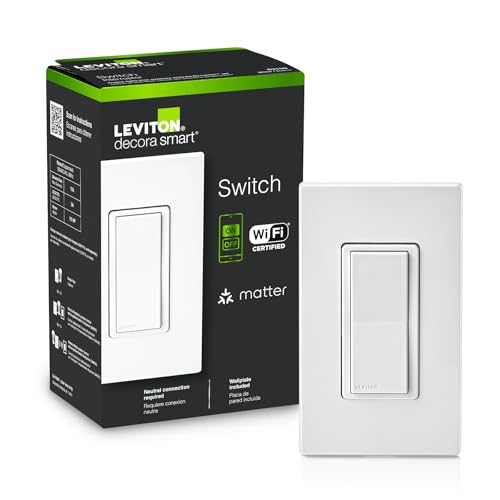
A versatile option with voice-friendly control and remote access. Leviton’s switch supports Wi‑Fi and is designed for compatibility with voice assistants like Google Assistant, Amazon Alexa, and Siri for hands-free operation. It enables scheduling and scenes to automate lights as part of broader routines.
Best for: homes that value strong voice assistant integration and flexible scene scheduling. Limitation: as with many Wi‑Fi switches, network reliability affects responsiveness.
Buying Guide: Key Considerations For Your Smart Light Switch
What wiring do you need? Most single-pole smart switches require a neutral wire. If your box lacks a neutral conductor, you’ll need a compatible model or an electrician’s assessment.
Do you want Matter compatibility? Matter-enabled switches like the TP-Link S505 offer broader cross-platform compatibility and potentially better local control, reducing reliance on cloud services.
What about network requirements? Most switches operate on 2.4 GHz Wi‑Fi. Confirm your router supports this band and that your network remains stable in the room where you install the switch.
Voice assistant support Understand which assistants you use. If you rely heavily on Alexa, prioritize switches advertised as fully compatible with Alexa. If you’re in a Google or Apple ecosystem, verify compatibility and routines.
Installation and app experience App-guided installs simplify setup, especially for first-time smart-home users. Look for clear installation steps, helpful troubleshooting, and reliable remote control features.
Future-proofing and scalability If you plan to expand to multiple rooms or add more devices, consider brands with easy multi-switch configurations or bundles (like the 2‑pack options) to keep your system cohesive.
Frequently Asked Questions
- Do smart light switches require a hub? Most do not; many work directly via Wi‑Fi. Some ecosystems may offer optional hubs for advanced automations.
- Is neutral wiring always required? Not always, but several popular models do require neutral wiring for proper operation. Check your switch’s specs and box wiring.
- Can I control these switches when I’m away from home? Yes, most switches support remote control through their companion apps when connected to the internet.
- Are Matter-enabled switches worth choosing? If you use multiple smart-home platforms or plan to integrate new devices, Matter can simplify compatibility and improve local control.
- What should I consider for voice control? Ensure the switch supports your preferred voice assistant and that routines or scenes align with your daily habits.
- Can I install these myself? Many models offer guided installation. If you’re unsure about wiring, consult a licensed electrician for safety.