If you’re searching for the best software and kits to create stop motion videos, you’ve found a clear, practical guide. This article highlights five top options that pair accessible software with hardware for beginners, students, and hobbyists, as well as more advanced setups for enthusiasts. Each pick is evaluated for who it’s best for, why it stands out, and a practical caveat to consider. A quick buying table follows to help compare at a glance.
The table below summarizes five strong stop-motion options, focusing on software capabilities, ease of use, and educational value. Use it as a quick reference to decide which kit fits your goals, whether you’re teaching a class, making LEGO brickfilms, or producing short creative projects at home.
| Product | Brand | Best For | Notes |
|---|---|---|---|
| Stopmotion Explosion: Complete HD Stop Motion Animation Kit | Stopmotion Explosion | Educators, beginners, and families looking for an all-in-one package | Includes 1080p camera and book with tutorials |
| HUE Animation Studio Pro | HUE | Serious beginners and hobbyists needing precise focus control | HD camera with manual focus, built-in lights, and included software |
| Zu3D Complete Stop Motion Animation Software Kit | Zu3D | Parents and kids seeking an easy, all-in-one setup | Two software licenses, webcam, and art supplies |
| Stop Motion Studio | Cateater | Quick projects and learners needing basic editing tools | Overlay and frame-by-frame editing features |
| Stop Motion Studio Pro | Cateater | Advanced hobbyists wanting more control | Same core features with enhanced capabilities |
Stopmotion Explosion: Complete HD Kit

Best for: Educators, schools, and families seeking a comprehensive package. This kit provides a full HD 1080p camera and an included book with step-by-step instructions, plus online tutorials. The all-in-one nature makes it easier to start without sourcing additional components. The kit is designed for LEGO brickfilms and other toy-based stop-motion work, appealing to classroom use and weekend projects. If you want a turnkey setup with learning materials, this is a strong choice.
Why chosen: Its bundled approach reduces setup friction and provides guided learning resources. The included camera is designed to connect to a computer without detaching, which helps maintain workflow during filming. A potential limitation is the reliance on the included materials for beginners; more advanced users might outgrow the bundled book and tutorials.
HUE Animation Studio Pro Kit
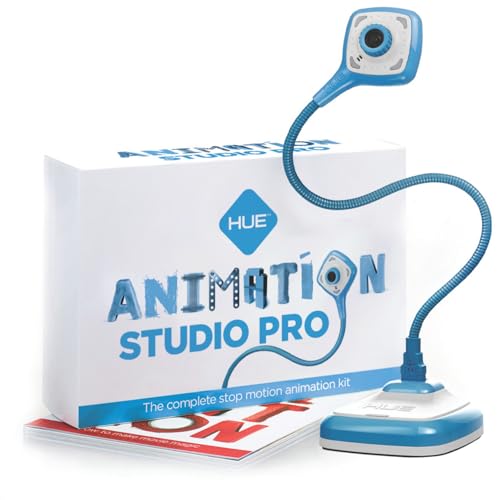
Best for: Animators who want tighter control over focus and exposure. The HUE HD Pro camera supports a wide field of view and a manual focus lens, which reduces the need to constantly adjust autofocus. The kit includes stop-motion software with sound effects and a 64-page color book, helping users learn techniques such as rotoscoping and time-lapse. This option suits creators who value precise camera control and a structured learning path.
Why chosen: The combination of a manual-focus camera and robust software helps prevent drift during filming, a common issue for beginners. A caveat is that the wider field of view may require more space to manage shots, especially in small desks or classrooms.
Zu3D Complete Kit
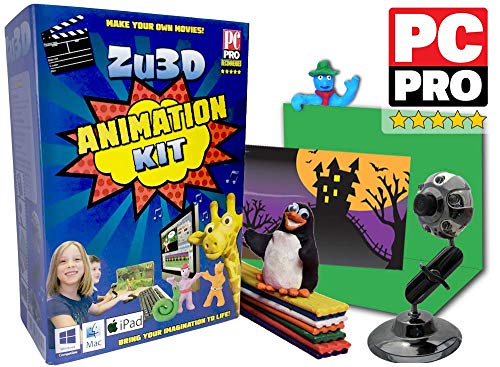
Best for: Parents and kids who want a friendly, all-in-one packaging. Zu3D provides complete software licenses, a webcam, and a handbook, making it straightforward for families to start creating animated stories together. It’s also used in schools, indicating reliability for classroom use. A potential limitation is that the software availability may vary by device, so verify compatibility with your computer or tablet before purchasing.
Stop Motion Studio
Best for: Beginners seeking a simple, approachable workflow with strong framing and editing features. Stop Motion Studio offers an overlay mode for frame differences, an integrated editor with frame-by-frame preview, and auto-capture at defined intervals. This makes it effective for quick, polished results without a steep learning curve. A caveat: more complex effects may require upgrading to the Pro version or combining with other tools for advanced workflows.
Stop Motion Studio Pro

Best for: Advanced hobbyists who want more control and higher production value. Pro adds extended capabilities while preserving the core user-friendly interface. Features include overlay difference viewing, a robust built-in editor, and flexible frame-capture options. A limitation is that some features may require more storage or processing power, so ensure your device meets the software’s requirements.
OVDSF Stop Motion Armature Kit

Best for: Intermediate to advanced users who want precise rigging and stable frame capture. This armature kit includes a sturdy stand, adjustable arms, and multiple connectors to support various shooting angles. The design reduces vibrations for smoother footage, which is important for professional-looking results. A caveat is that assembly and setup may require more time and care compared to plug-and-play kits.
Buying Guide: Key Purchase Considerations
- Purpose and Skill Level: Choose a kit that matches your experience, whether a classroom-friendly all-in-one or a modular setup for experimentation.
- Camera and Focus: Manual focus and stable imaging reduce drift in stop motion; consider whether you need built-in lights or a separate lighting setup.
- Software Capabilities: Look for overlay differences, frame-by-frame editing, and auto-capture features to streamline production.
- Expansion Potential: If you plan larger projects, pick kits with flexible rigs, extra licenses, or upgrade paths.
- Space and Workflow: Consider your workspace size; wider cameras and larger rigs require more room for shooting and staging.
- Educational Value: For schools or families, bundled learning materials and step-by-step guides can accelerate learning and engagement.
FAQ
- What is the simplest stop motion kit for beginners?
Zu3D Complete Kit and Stop Motion Studio are well-suited for beginners due to intuitive software and bundled teaching materials.
- Do I need special lighting for stop motion?
While some kits include built-in lights, many setups benefit from consistent, diffuse lighting to avoid flicker and shadows during shooting.
- Is a high-end camera necessary for stop motion?
No. A capable camera with good manual focus and stable exposure is sufficient for quality stop-motion projects, especially when paired with solid software.
- Can I use Stop Motion Studio on mobile devices?
Yes. Some plans offer mobile-friendly versions or companion apps to keep animating on the go.
- What should I consider when buying a rig for animation?
Look for adjustable arms, vibrations reduction, connector variety, and compatibility with your camera and software.