Looking for the best SSDs to speed up your NAS? This guide highlights five high-endurance, NAS-ready SSDs that boost caching, boot reliability, and 24/7 operation. Ideal for home labs, small offices, and small businesses needing responsive file access. Best-for buyers: home NAS enthusiasts; small offices requiring steady performance; content creators with multi-user NAS setups. Below is a quick summary table of the top picks.
| Product | Best For | Why Choose |
|---|---|---|
| Western Digital 4TB WD Red SA500 NAS | Heavy NAS caching | High endurance; large cache; purpose-built for NAS |
| Gigastone 1TB High Endurance SSD (2-Pack) | Budget multi-SSD NAS setups | High endurance; reliable 24/7; good for RAID arrays |
| Western Digital 2TB WD Red SA500 NAS | Mid-size NAS caching | Strong endurance; reliable NAS performance |
| Samsung SSD 870 EVO 2TB | General NAS acceleration | Proven SATA performance and broad compatibility |
| Gigastone High Endurance SSD 512GB (2-Pack) | Compact NAS SSD arrays | High endurance; suitable for multi-device NAS setups |
Western Digital 4TB WD Red SA500 NAS SSD
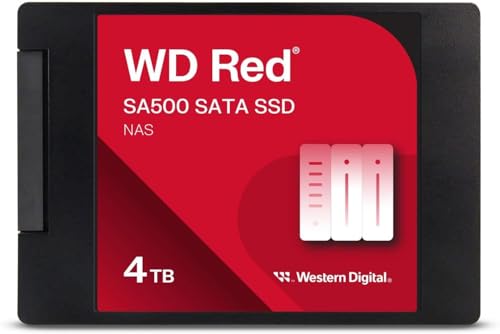
The WD Red SA500 NAS SSD is storage optimized for caching in NAS systems, enabling rapid access to frequently used files. It is designed for 24/7 operation with higher endurance to handle heavy read and write loads. Purpose-built for NAS, it leverages Western Digital 3D NAND to deliver dependable SATA performance for both home and business environments. Best for users who want a single, reliable NAS drive with strong cache performance and straightforward deployment.
Best for: small offices or home NAS setups that prioritize steady caching performance and long-term reliability. Limitation: as a SATA SSD, it may not match NVMe speed in random workloads, but it excels in NAS caching scenarios.
Gigastone 1TB High Endurance SSD (2-Pack)

This 1TB high endurance SSD comes as a two-pack, designed for 24/7 NAS workloads. It offers sustained transfer speeds up to 550 MB/s and includes features like data protection, power-loss protection, ECC, and easy integration. It’s a strong pick for NAS RAID setups or multi-user environments where consistent performance matters. Best for: NAS users who want a budget-friendly, high-endurance option for caching and multi-drive arrays.
Limitation: Not suggested for server models or SAN environments; verify NAS compatibility with your enclosure before purchasing.
Western Digital 2TB WD Red SA500 NAS SSD

The WD Red SA500 2TB NAS SSD mirrors the 4TB model’s caching and endurance advantages, optimized for NAS workloads. It provides reliable 24/7 operation and optimized caching to access frequently used files quickly. Best for: mid-sized NAS setups that need a balance of capacity and cache performance. Limitation: lower total capacity than the 4TB model, which may affect large-archive workflows.
Samsung SSD 870 EVO 2TB

The Samsung 870 EVO SATA III SSD delivers industry-leading reliability and performance. It maximizes the SATA interface with sequential speeds up to 560 MB/s read and 530 MB/s write, making it a robust choice for NAS caching or general NAS acceleration. It is widely compatible with most NAS enclosures and motherboards. Best for: users who want a proven SATA SSD with broad compatibility and strong long-term performance. Caution: may require for RAID configurations to check write endurance across the array.
Gigastone High Endurance SSD 512GB (2-Pack)

This 512GB high endurance SSD comes as a two-pack, tailored for NAS RAID configurations and home-office NAS setups. It offers up to 550 MB/s sequential transfer speeds and includes data protection features, power loss protection, and ECC. Best for: NAS builders needing compact, reliable SSDs in a multi-drive array. Limitation: lower per-drive capacity means more drives in the array, which can complicate management.
Buying Guide
What matters most when choosing an NAS SSD?
- Endurance and workload rating: Look for TBW or DWPD ratings suitable for 24/7 NAS use. Higher endurance reduces wear on cache-heavy NAS environments.
- Capacity vs. caching needs: For caching, larger capacities help store more frequently accessed data. If budget-constrained, balance capacity with endurance and speed.
- Interface and compatibility: SATA SSDs are common in consumer NAS, but some setups benefit from NVMe caching if your NAS supports it. Confirm drive compatibility with your NAS model.
- ECC and data protection: Features like ECC, power-loss protection, and robust error correction improve long-term reliability, especially in multi-user NAS contexts.
- RAID considerations: If building a NAS RAID array, ensure the chosen drives perform well in arrays and manage heat and vibration in multi-drive enclosures.
Quick comparison by use case:
- Best for caching in a busy NAS: WD Red SA500 4TB or 2TB models, Samsung 870 EVO 2TB.
- Best for multi-drive NAS RAID arrays: Gigastone 1TB or 512GB high-endurance packs.
- Best overall SATA NAS performance: Samsung 870 EVO 2TB for broad compatibility and proven stability.
FAQ
What is NAS caching and why do I need an SSD for it?
NAS caching uses fast SSD storage to keep frequently accessed data ready, speeding up typical NAS workloads and reducing latency for shared files.
Is SATA SSD enough for NAS, or should I consider NVMe?
SATA SSDs are widely compatible with most NAS models and offer solid performance. NVMe caching is beneficial if your NAS supports it and you need higher throughput.
How many SSDs should I use in a NAS RAID array?
The number depends on capacity needs and performance goals. More drives in an array can improve speed and fault tolerance but increases cost and management.
What endurance rating should I look for in NAS SSDs?
Choose drives with higher TBW or DWPD ratings for heavy read/write workloads. NAS environments often operate nonstop, so endurance matters.
Can I mix SSDs from different brands in a NAS?
Yes, but for best performance and reliability, use drives with similar endurance and performance profiles within the same array.