Looking for a protective, easy-to-carry case for your Steam Deck? This guide highlights five top options that balance protection, portability, and practical features. Each pick targets a distinct user type—travelers, casual handheld players, and power users who want extra storage, cooling, or kickstand features. Below, you’ll find a quick product summary, followed by detailed sections to help you choose the best case for your needs.
| Product | Best For | Key Benefit |
|---|---|---|
| JSAUX PC0104 ModCase | Power users who want modular protection | Detachable front shell and metal kickstand |
| JSAUX Carrying Case (Hard Shell) | Travel and organization | Large capacity with two layers |
| tomtoc Slim Carrying Case | Lightweight transport | Super slim, high protection |
| UYIYE Kickstand Case | Tabletop gaming on the go | Built-in foldable kickstand |
| JSAUX ModCase (PC0104 variant) | All-around protection with modular design | Modular parts for customization |
JSAUX PC0104 ModCase for Steam Deck

The JSAUX PC0104 ModCase is a modular protective solution designed for both Steam Deck OLED (2023/2026+) and the original LCD model. It provides precise access to all controls while adding a detachable front shell for screen and thumbstick protection. The kit includes a modular metal kickstand that can be removed to keep the device lightweight on the go. This pick is best for users who want complete protection without sacrificing modular customization and on-tabletop stability.
- Best for: Steam Deck owners seeking full protection with a detachable front cover and a robust metal kickstand.
- Why chosen: It combines back protection with a secure front shield, plus a rock-solid kickstand for tabletop play.
- Caution: The modular setup adds components that require careful assembly for optimal fit.
JSAUX Carrying Case for Steam Deck/ROG Ally

This hard-shell carrying case from JSAUX is designed for Steam Deck (OLED), ROG Ally, and ROG Ally X (2026). It emphasizes daily protection with a thickened EVA shell and a fleece interior to guard the screen. The upper and lower layers offer organized storage for a charger, power bank, cables, and more. It’s ideal for travelers who want to keep the Deck or ROG devices safe and accessible without removing the case.
- Best for: On-the-go travelers needing a sturdy, organized case for Steam Deck and accessories.
- Why chosen: Strong shell plus internal layout prevents damage from bumps and pressure during transit.
- Caution: Accessories are not included; you’ll need to place your items yourself.
tomtoc Slim Carrying Case for Steam Deck
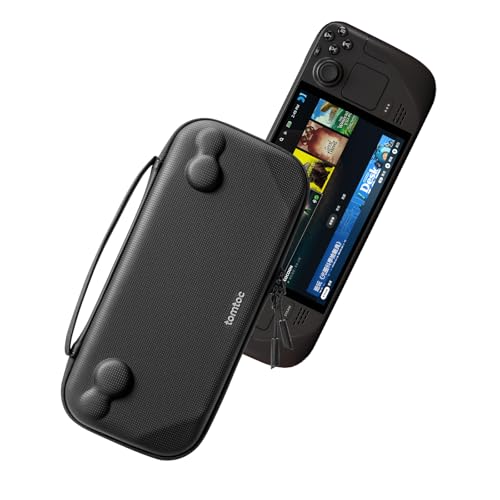
Tomtoc’s Slim Carrying Case targets portability without sacrificing protection. The hard shell is designed to fit Steam Deck and Steam Deck OLED, with precise curves to protect buttons and joysticks. A built-in padded buffer guards against pressure, making this a strong choice for commuters and travelers who value a compact footprint and reliable protection on the move.
- Best for: Users who prioritize ultra-portable protection and a slim profile.
- Why chosen: Lightweight, compact design with solid protection against knocks and bumps.
- Caution: Some accessories may require extra space if you carry many peripherals.
JSAUX Carrying Case for Steam Deck/OLED
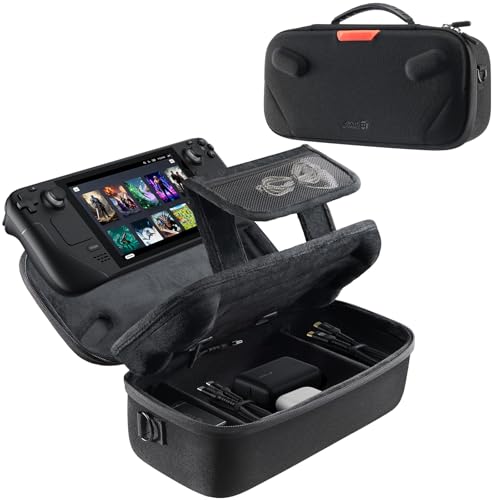
JSAUX’s upgraded hard shell case supports both Steam Deck and Steam Deck OLED. Its dual-layer storage design keeps the console and microSD cards secure on the top, while the bottom holds a charger, power bank, cables, and more. A removable hook-and-loop divider lets you customize the layout. Use this when you want an all-in-one travel case with flexible organization.
- Best for: Users who want organized storage with a flexible interior.
- Why chosen: Built to protect during commute and travel while keeping items accessible.
- Caution: Accessories are not included; you’ll add your own gear.
UYIYE Kickstand Case for Steam Deck OLED & LCD

The UYIYE Kickstand Case focuses on hands-free tabletop gaming with a built-in foldable kickstand. It is precision-molded to fit both Steam Deck OLED and LCD models, offering exact port access without removing the case. The design includes a sweat-resistant cowhide grip with a cushioned EVA lining to reduce palm fatigue during extended sessions. This makes it a strong option for players who frequently use the Deck on a table or in bed.
- Best for: Players who want a built-in kickstand and a comfortable grip for longer sessions.
- Why chosen: Integrated kickstand plus ergonomic grip improves comfort and practicality.
- Caution: Slightly thicker profile due to the kickstand may affect ultra-compact storage.
JSAUX PC0105 Kickstand Protective Case

This case combines a protective shell with a functional kickstand. It is compatible with Valve Steam Deck and offers four adjustable viewing angles (35°, 45°, 55°, 65°). The design avoids interaction with the docking area when not in use, providing flexibility for seating preferences while playing. Choose this if you want reliable stand angles for comfortable viewing during extended sessions.
- Best for: Users who want adjustable viewing angles and integrated protection.
- Why chosen: The kickstand is engineered for stability and easy angle changes.
- Caution: Not compatible with some protective skins or third-party docking stations.
Syntech Protective Silicone Case for Steam Deck

The Syntech silicone case offers an all-around protective layer for both Steam Deck OLED and LCD. Its zero-clearance design improves alignment with the screen and ports, reducing looseness along edges. The silicone is recycled and durable, tested for flexibility and bending, with a larger Type-C cutout for peripherals without removing the case. It is not compatible with the official dock, making it a better pick for handheld use only.
- Best for: Users seeking lightweight, all-around protection with reliable edge alignment.
- Why chosen: Durable silicone with a precise fit reduces edge wear and screen exposure.
- Caution: Not suitable if you plan to dock the Steam Deck with the official dock.
Buying Guide
- Protection level: Decide between hard-shell protection, modular systems, or silicone sleeves based on how aggressively you travel with your Steam Deck.
- Port and accessory access: Ensure the case preserves easy access to vents, triggers, and ports for uninterrupted gameplay.
- Portability vs. storage: Slim cases are lighter and easier to carry; larger cases offer compartmentalization for cables and chargers.
- Kickstand and stand options: If you play tabletop frequently, a built-in kickstand can reduce the need for extra accessories.
- Compatibility: Confirm whether the case supports both Steam Deck models (OLED and LCD) if you own multiple versions.
- Material and build: PC-ABS, silicone, or EVA foam each offer different durability and grip characteristics; consider your grip preference and wear tolerance.
Frequently Asked Questions
- What is the best overall case for protection? A case with a detachable front shield and a robust kickstand often provides the most complete protection for both screen and buttons.
- Are these cases compatible with the Steam Deck OLED and LCD? Several options list compatibility with both models; check precise cutouts and model notes before purchasing.
- Do these cases add significant bulk? Some modular or kickstand cases add thickness, which can affect portability; slimmer cases prioritize travel-friendly profiles.
- Should I choose a hard shell or silicone case? Hard shells excel at impact protection, while silicone offers edge protection and a snug fit with flexible grip.
- Will these cases fit Docking Station use? Most cases are not designed to stay on during docking; remove the case if docking is required.
- Do cases include storage for cables and chargers? Several options feature built-in compartments or dual layers for organizing accessories.