Looking for the best tablet to read PDFs? This guide highlights five options that balance readability, battery life, and note-taking features. Each choice is best for different reading needs—from lightweight eInk-style displays for distraction-free reading to high-contrast paper-like screens for markup and study. Below, you’ll see who benefits most from each device and why it’s a strong pick for PDF work.
Quick comparison table of selected products:
| Product | |||
|---|---|---|---|
| PRITOM L8 | LCD 8″ 1280×800 | Android ecosystem with apps and flexibility | |
| reMarkable Paper Pure Bundle | 10.3″ E-Ink Black-and-White | Closest to paper experience for PDFs | |
| reMarkable Paper Pure | 10.3″ E-Ink Black-and-White | Efficient PDF annotation and organization | |
| PocketBook Verse | 6″ E-Ink Carta HD | Eye-friendly display with flexible formats | |
| Musnap Ocean 64GB 7″ | 7″ Color E-Ink | Color screen for highlighted visuals and notes |
PRITOM L8 Reading Tablet
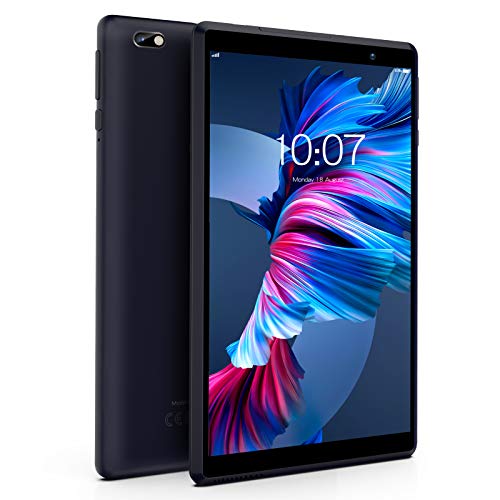
The PRITOM L8 runs Android 13 with 64 GB storage and a Quad-core processor. Its 8-inch 1280×800 IPS display offers clear text and broad viewing angles. The device supports a micro SD card up to 512 GB for PDF libraries and documents, and a 3900 mAh battery aims for long reading sessions. Best for: readers who want a versatile Android tablet that can handle PDFs alongside streaming and light apps. Limitation: 8-inch size may require zoom when reading very large PDFs or multi-column layouts.
reMarkable Paper Pure Bundle – 10.3” Paper Tablet

The reMarkable Paper Pure Bundle pairs a 10.3-inch black-and-white E-Ink display with a Mist Green sleeve and Marker Plus. It emphasizes handwriting and document markup, making it ideal for reading long PDFs and annotating them by hand. Best for: professionals and students who prefer a distraction-free, paper-like experience and frequent notes. Caution: color PDFs and image-heavy documents may not display with the same contrast as on LCD tablets, though the reading experience remains strong for text PDFs.
reMarkable Paper Pure – 10.3” Paper Tablet

This is the standalone version of the 10.3” Paper Tablet, designed for focused reading and extensive note-taking. Best for: users who want seamless PDF markup, filing, and drawing in a single device. Limitation: Like other E-Ink devices, color content and fast-refresh video are limited compared to LCD tablets, which may affect multimedia PDFs.
Musnap Ocean 64GB+4GB 7” E-Ink Reader

The Musnap Ocean offers a 7-inch E-Ink display with 64 GB of storage and 4 GB RAM, running Android for flexible apps. It supports handwriting with a compatible stylus and provides long battery life for sustained reading. Best for: readers who want a compact, book-like device with handwriting support. Caution: Stylus compatibility is noted but the pen is sold separately, so expect an extra accessory purchase.
PocketBook Verse E-Readers

The PocketBook Verse features a 6-inch E-Ink Carta HD display with adjustable SMARTlight for any lighting condition. It supports multiple formats and DRM-free PDFs, making it a practical choice for portable PDF reading. Best for: minimalist readers who prioritize a glare-free screen and extensive format support. Caution: Smaller display means zooming for dense PDFs can be necessary, and fewer annotation tools than larger tablets.
Musnap Ocean C 64GB+4GB 7” Color E-Ink

This 7-inch color E-Ink reader mirrors the 7” form factor with color capability, making it suitable for PDFs that include color diagrams or images. Best for: readers who want color highlights in a compact device. Caution: Color E-Ink experiences can have slower refresh in some PDFs, impacting rapid page-turns or heavy annotations.
Buying Guide
What features matter most for PDF reading? Look for display type, screen size, storage, battery life, and annotation tools. For long documents or research, larger screens and strong note features help. If you want a distraction-free workflow, paper-like displays with handwriting support can reduce eye strain and improve focus.
Display and reading comfort
- LCD vs E-Ink: E-Ink and color E-Ink reduce eye strain for long sessions, but gloss and refresh rates differ.
- Screen size: Larger displays (10.3″) improve readability of dense PDFs; smaller screens are ultra-portable.
- Backlight and SMARTlight: Adjustable brightness and color temperature support reading in varied lighting.
PDF support and annotations
- PDF formats: Ensure PDFs render clearly and support bookmarks, highlights, and notes.
- Annotation tools: Handwriting or stylus support helps with margin notes and edits.
- File handling: MicroSD expansion or ample built-in storage helps manage large libraries.
Battery life and ecosystem
- Battery: Aimed for long reading sessions, especially on E-Ink devices; LCD tablets vary with usage.
- App access: Android-based tablets offer broad app support; dedicated e-readers focus on reading and note-taking.
- Accessories: Consider stylus availability and sleeve or case options for comfort.
Choosing by use case
- Best for distraction-free reading and markup: reMarkable Paper Pure bundles.
- Best all-around Android tablet for PDFs and apps: PRITOM L8.
- Best ultra-portable: PocketBook Verse for travel and quick reads.
- Best color highlights and compact size: Musnap Ocean C 7” Color E-Ink.
Frequently asked questions
- Which tablet is best for large PDF documents with markup? The reMarkable Paper Pure models excel at annotation and long-form reading on a large, paper-like screen.
- Is an E-Ink reader better than an LCD tablet for PDFs? For long reading sessions, E-Ink reduces eye strain; for interactive PDFs with multimedia, LCD tablets perform better.
- Do PDFs display well on smaller screens? Dense PDFs may require zooming or reflow; larger screens provide a more comfortable experience.
- Can I annotate PDFs on Android tablets? Yes, Android tablets with a stylus support markup tools in various apps.
- Is color important for reading PDFs? Color is useful for diagrams and highlighted sections; color E-Ink options provide some color but may have slower refresh.
- Are there affordable options for PDF reading on the go? Yes, compact 6″ to 7″ E-Ink devices or budget Android tablets offer solid PDF support at lower cost.