Answer: For toddlers, choose durable tablets with strong parental controls, simple interfaces, eye-friendly screens, and long battery life. The top picks below are chosen for different needs—durability and kid-proof cases, strong parental controls, or expanded storage. Best for: parents seeking robust hardware with reliable parental controls; best for: kids who benefit from built-in learning apps and Google Kids Space; choose this if you want a balance of performance and protection; avoid this if you need the largest screen or the most advanced software.
| Product | Best For | Key Benefit |
|---|---|---|
| HOTTABLET Kids Tablet (Pink) | Young children needing parental controls | Android 12 with Kids mode and profiles |
| Amazon Fire 7 Kids Tablet (Newest) | Value-conscious families | Amazon Kids+ and durable build |
| HOTTABLET Kids Tablet (Blue) | Durable tablets with case protection | Kid-proof case and parental controls |
| PEICHENG Kids Tablet 7″ | Educational play with expandability | Android 12, parental controls, SD expansion |
| COLORROOM 2026 Android 15 Tablet | Multi-tasking and longer-term use | Large RAM/ROM and eye-friendly display |
HOTTABLET Kids Tablet 7″ Pink

The HOTTABLET 7-inch Kids Tablet runs on Android 12.0 with a children’s mode and Google GMS. It includes a 4-core CPU, 4GB RAM (expandable to 2GB extra), 32GB storage, and an IPS display at 1024×600. It supports Netflix with Widevine L1 and offers eye protection mode. A 3000mAh battery supports about 8 hours of mixed use. Best for: parents needing a budget-friendly device with robust parental controls and a kid-friendly ecosystem. Limitation: 32GB storage may fill quickly with apps and media; consider microSD expansion if available.
Who this is best for: Families seeking a capable entry tablet with easy parental controls and a protective case for toddlers.
Why selected: Combines a kid-safe Android environment with content filters, customizable profiles, and offline/online access.
Caution: Ensure adequate microSD expansion if you plan to store many apps or media locally.
Amazon Fire 7 Kids Tablet (Newest)

Amazon Fire 7 Kids Tablet offers a 7-inch display with access to Amazon Kids+ for a year, kid-friendly content, and a two-year worry-free guarantee. The bundle includes a kid-proof case and long battery life suitable for classroom-style learning and downtime. Best for: families wanting a curated set of educational content and strong parental controls backed by Amazon’s ecosystem. Limitation: After the initial year, Kids+ may require a subscription to maintain access to content.
Who this is best for: Families seeking a trusted, kid-focused tablet with a broad library of curated content and simple controls.
Why selected: Strong parental controls, durable design, and bundled educational content make this a practical choice for toddlers’ early digital learning.
HOTTABLET Kids Tablet 7″ Blue
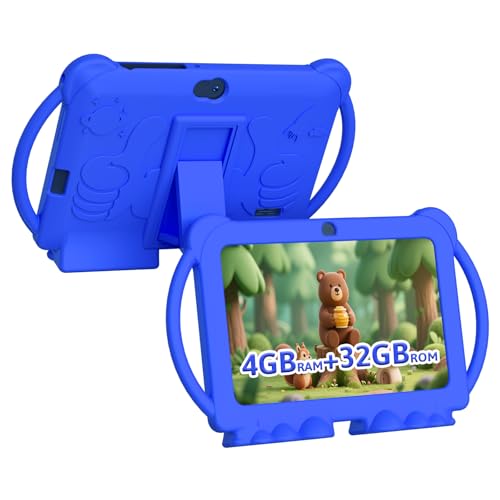
The Blue model mirrors the Pink variant with Android 12, 4GB RAM (2GB original + 2GB expandable), 32GB ROM, and 8-hour mixed-use battery. It includes dual cameras and a kid-proof case. Best for: households needing color-coordinated options or a second device with the same capabilities. Limitation: Storage may be tight for many apps; consider expansion or selective app installation.
Who this is best for: Families wanting a durable, affordable option with consistent performance across color choices.
Why selected: It provides parity with the Pink model—same features and protections—allowing you to match devices to kids’ preferences or siblings.
PEICHENG Kids Tablet 7″ Android 12

PEICHENG’s 7-inch Android 12 tablet features a quad-core processor, 4GB RAM, 32GB storage, and microSD expansion up to 512GB. It runs on Google GMS with Netflix support via Widevine L1 and includes front 2.0MP/ rear 5.0MP cameras. Parental controls let parents limit screen time, manage apps, and filter unsafe content. Best for: families needing expandable storage and a straightforward parental control setup. Limitation: 512GB microSD expansion is optional; plan ahead if you need large local media libraries.
Who this is best for: Parents who want easy app access via Google Play and room to grow storage with a microSD card.
COLORROOM 2026 10.1″ Android Tablet for Kids

This 2026 COLORROOM tablet runs Android 15, features an octa-core CPU, 10GB+64GB ROM plus 1TB expansion, and a 10.1-inch eye-friendly display. It ships with Google Kids Space and parental controls to filter content and set time limits. Best for: households needing higher performance, more storage, and extended play or study time. Limitation: High RAM/ROM may be more than needed for very young toddlers; ensure the device stays within a safe, age-appropriate use plan.
Who this is best for: Families pursuing longer-term device use with more multitasking, larger screen, and robust parental controls.
Buying Guide: Key Purchase Considerations
What age is appropriate for a toddler tablet?
Most tablets aimed at toddlers are suitable for ages 3–6, with simplified interfaces and active parental controls. For younger children, durability and safety features are paramount.
What should I look for in parental controls?
Look for time limits, profile-based access, app filtering, content restrictions, and the ability to approve or block apps. Google Kids Space and Amazon Kids+ are common ecosystems that simplify management.
Durability vs. simplicity
Durable, kid-proof cases and bump protection reduce damage risks. Simpler interfaces help toddlers navigate without frustration, while more complex systems suit older kids.
Storage and expandability
4–32GB built-in storage is common, with microSD expansion offering room for photos, videos, and offline apps. If you plan more offline media, prioritize expandable storage.
Display and eye comfort
Eye-friendly displays with anti-blue-light features help reduce eye strain during extended use. A larger screen can aid learning, but may affect portability.
Battery life
Long battery life is important for classroom-style use and travel. Check real-world estimates and consider models with fast charging if available.
FAQ
- Are kid tablets safe for toddlers? Yes, when used with robust parental controls, guarded content, and age-appropriate apps.
- Do these tablets require a subscription? Some bundles include a year of Kids+ content; after that, ongoing access may require a subscription.
- Can toddlers learn with these tablets? Yes, many include educational apps and spaces designed for early learners.
- Should I worry about blue light? Choose models with eye-protection features or screens designed to minimize blue light.
- Is expansion storage important? If your child uses many apps or stores videos offline, expandable storage is beneficial.
- What is the best value? Look for a balance of parental controls, durability, and included educational content in a bundled package.