Looking for a tablet with a stylus that balances productivity and multimedia? This guide highlights five strong options for students, professionals, and casual users who want precise input, responsive screens, and solid performance. Each pick includes who it’s best for, why it stands out, and a practical caveat. The buyer persona ranges from students needing note-taking and quick searches to creatives who draw or annotate on the go.
| Product | Best For | Key Advantage | Limitations |
|---|---|---|---|
| Lenovo Idea Tab (11″ 2.5K, 90Hz, Tab Pen) | Students and light multitaskers | Circle It Search with Google for instant results | Base memory may be limiting for heavy apps |
| Lenovo Idea Tab (11″ 2.5K, 90Hz, 8/256GB) | Power users and multitaskers | Higher RAM and storage for more apps and files | Similar form factor, slightly higher cost |
| NOVOJOY Android 10.1″ Tablet with Stylus | On-the-go note-taking | Includes case and stylus for quick writing | Android 12/15-era features may vary by model |
| Samsung Galaxy Tab S10 Lite with S Pen | Creative work and media | Integrated S Pen for drawing and jotting | Premium features may come with higher price |
| ZZB 2-in-1 Android Tablet Set with Keyboard, Case, Stylus | Productivity on the move | All-in-one with keyboard and stylus | Bulkier footprint than a pure tablet |
Note: All five selections are chosen for their stylus compatibility and balanced performance. When selecting, consider payload (RAM and storage), display quality, battery life, and the availability of a precise stylus experience that fits your typical tasks.
Lenovo Idea Tab — 11″ 2.5K IPS Panel With Pen

Features include a sharp 11″ 2.5K display and a 90Hz refresh rate powered by the MediaTek Dimensity 6300 processor. The Tab Pen enables Circle It Search for quick results and translations without switching apps. Best for students who need fast search-and-annotate capabilities and reliable campus use. The integrated pen support is a clear advantage for note-taking and drawing. Caution: base memory configurations may limit heavy multitasking with many apps open at once.
Lenovo Idea Tab — 11″ 2.5K IPS, 8GB RAM Variant

Features emphasize higher memory and storage for better multitasking and larger apps libraries. This variant suits power users and students who keep many documents, apps, and media files on hand. It continues to leverage Circle It Search for fast in-app language translation and search. Best for heavier workloads; better for users who want more headroom. Caution: stem from similar base chassis; weight and size remain modestly portable, but not as light as ultra-compact tablets.
NOVOJOY Android 10.1″ Tablet With Stylus

Best for quick note-taking and light productivity on the go. The device ships with a foldable case and stylus, making it easy to capture ideas during commutes or classes. The 10.1″ HD IPS display supports clear visuals for reading and media consumption. Limitation: Android 15 features and expansion options vary by model; storage can feel modest for media-heavy users.
Samsung Galaxy Tab S10 Lite — 10.9″ With S Pen

Best for creators and students who want precise input directly on-screen. The S Pen is integrated without a separate purchase, enabling drawing, note-taking, and quick math. The 10.9″ display with Vision Booster supports varying lighting conditions. Caution: as a premium option, the overall package may be pricier than some competitors; consider whether you need the full S Pen ecosystem for your workflow.
ZZB Android 10″ 2-in-1 Tablet Set With Stylus
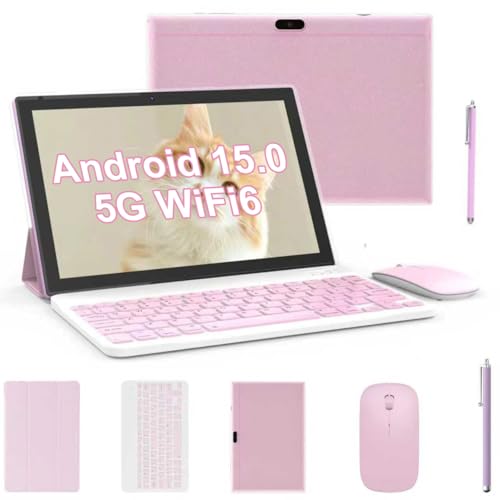
This 2-in-1 kit blends a tablet, keyboard, mouse, and stylus for a portable workstation. It features a 10.1″ IPS display, 6000mAh battery, and Android 15 with a fast quad-core CPU. Best for students and remote workers who want a single device for writing, browsing, and light productivity. Choose this if you value an all-in-one package; avoid if you prefer a lighter, slimmer tablet purely for consumption or gaming.
Buying Guide
What should I look for in a tablet with a stylus?
Consider display size, resolution, and color accuracy for reading and sketching. Ensure the stylus is responsive, has low latency, and supports pressure sensitivity if you plan detailed drawing or precise note-taking. RAM and storage determine multitasking ease and file storage. Battery life matters for long study sessions or travel use.
Which features matter most for education vs. creative use?
Education-focused tablets benefit from strong handwriting input, reliable note-taking apps, and search features. Creative use prioritizes a precise stylus, rendering performance, and software compatibility for drawing or design tasks. In some cases, a bundled keyboard and a protective case boost productivity.
Is a higher refresh rate important?
Yes for smooth scrolling and responsive touch interactions. A 90Hz panel delivers a noticeably smoother experience than a standard 60Hz, especially in note-taking, web browsing, and media consumption.
What about connectivity and expansion?
Look for Wi-Fi 6/6E options for faster internet on campus or travel. Storage expansion via microSD can dramatically increase capacity for media and documents. Ensure the device supports the apps you rely on and is Google Play-certified if you use Android apps.
How to decide between standalone tablets and 2-in-1 sets?
2-in-1 sets with keyboards are ideal for productivity, writing, and spreadsheet work. Standalone tablets are lighter and often more affordable, suitable for reading, streaming, and light note-taking. Choose based on how often you’ll need a physical keyboard or mouse.
FAQ
- Do all tablets with stylus come with the pen included? Most do, but verify if the stylus is included in the package.
- Can a stylus affect display performance? Not typically; stylus input is designed to be responsive without harming display longevity.
- Is Android or iPad better for note-taking? This guide focuses on Android options; overall preference depends on app availability and ecosystem.
- Will a higher RAM help with multitasking? Yes, more RAM generally improves multitasking and app-switching performance.
- Are 2-in-1 sets worth it for students? If you need a keyboard and precise input in one device, a 2-in-1 can be very convenient.