Looking for a travel-ready mouse that pairs easily with a laptop and stays quiet on the move? This guide highlights five compact, reliable options tailored for frequent travelers, students, and remote workers. Each pick is evaluated for portability, battery life or power options, multi-device capability, and ease of use on varied surfaces. The best-for notes help you pick by work style—whether you need silent clicks, multi-device switching, or foldable portability.
Summary of Selected Mice
| Product | Best For | Why It Stands Out |
|---|---|---|
| Logitech M240 Compact Silent Bluetooth Wireless Mouse | Quiet office use and travel | Silent clicks, long battery life, USB-C friendly pairing |
| Logitech M350s Pebble 2 Bluetooth Wireless Mouse | Expressive style with multi-device use | Slim, portable, Easy-Switch across up to 3 devices |
| Logitech Mobi Fold Foldable Wireless Mouse | Ultra-portable travelers | Foldable design, multi-device, light and compact |
| Verbatim Mini Travel Optical Mouse | Budget-conscious travelers | Ultra-compact, wired reliability, no batteries needed |
| Dell Bluetooth Travel Mouse MS700 | Slim, versatile Bluetooth travel | Lightweight, 3-device pairing, quick switching |
Logitech M240 Compact Silent Bluetooth Wireless Mouse – Graphite

The Logitech M240 is a compact Bluetooth mouse designed for quiet operation and long battery life. It suits travelers who want a dependable, low-distraction input device without a dongle. Best for: business travelers, students, and anyone who values silent clicks during meetings or late-night work. The mouse uses Bluetooth pairing for a simple, dongle-free connection and offers up to 18 months of battery life with auto-sleep to conserve power. Caution: if you prefer a wired or USB-receiver option, this model relies on Bluetooth.
Logitech M350s Pebble 2 Bluetooth Wireless Mouse – Black

The M350s Pebble 2 blends style with travel-ready practicality. It is best for users who want a slimmer profile, a few color choices, and the ability to switch between up to three devices via Easy-Switch. It’s lightweight and portable, built with recycled plastic for an eco-conscious option. Limitation: the slim form may feel less comfortable for users who prefer larger ergonomics over extended sessions.
VssoPlor Wireless Mouse, 2.4G Slim Computer Laptop Mouse

Although not in the initial top five, the VssoPlor model is a strong note for those who want a cost-effective, stable connection with a longer 10 m operating range and high DPI. It’s best for users who work across multiple surfaces and need reliable 2.4 GHz wireless performance. Caution: data suggests a need for occasional connectivity checks on busy Wi-Fi networks.
Logitech Mobi Fold Foldable Wireless Mouse with Quiet Click

The Mobi Fold is built for ultimate portability with a foldable design that slides into pockets or small bags. It suits travelers who want a ready-to-use device without bulk. It supports multi-device connections and Quick Pair features, making it simple to switch between devices. Limitation: small foldable form can reduce grip comfort for long typing sessions.
Verbatim Mini Travel Optical Mouse
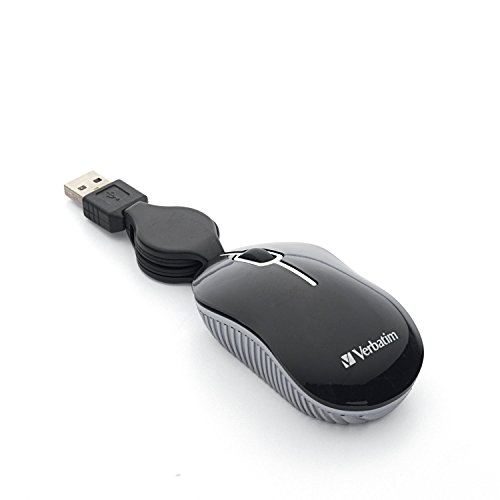
The Verbatim Mini Travel Optical Mouse is a wired option optimized for travel budgets and minimal space. It avoids batteries and pairing hassles, offering dependable plug-and-play performance. Best for: users who want a compact, no-fuss wired alternative. Caution: the wired connection eliminates wireless convenience for some travelers.
Dell Bluetooth Travel Mouse MS700
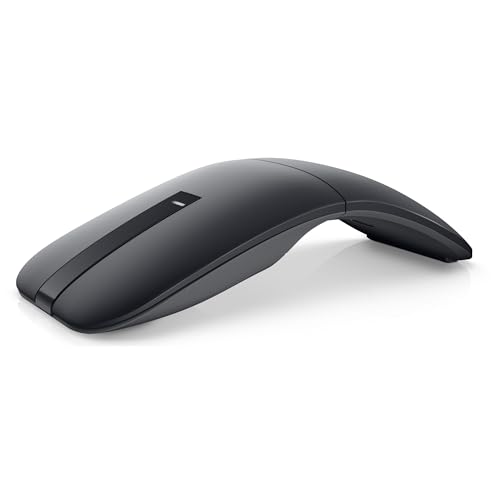
The Dell MS700 is designed for travelers who value a slim, lightweight profile and easy device switching via Bluetooth 5.0. It supports pairing with up to three devices and features a twist-off design to turn off when not in use. Best for: professionals who regularly switch between laptops, tablets, and desktops. Caution: some users may prefer a taller ergonomic profile for extended use.
Buying Guide: Travel Mouse Considerations
- Connectivity: Choose Bluetooth for dongle-free pairing or a USB receiver for a stable wired-like experience. Multi-device switches are valuable when you juggle a laptop, tablet, and desktop.
- Portability: Foldable or ultra-compact designs save space in bags. Consider weight and pocketability for frequent travelers.
- Battery Life: Silent or low-power modes extend life on the road. If a mouse uses replaceable batteries, check available sizes and frequency of changes.
- Surface Compatibility: Most travel mice work on optical sensors across typical laptop surfaces, but some perform better on reflective or glossy surfaces. A small tracking surface can affect precision for precise editing tasks.
- Ergonomics: Slim or ambidextrous shapes suit different grips. If you work long sessions, prioritize a comfortable contour and stable grip over pocketability alone.
- Durability: Look for sturdy hinges in foldable designs and robust scroll wheels, as travel can expose devices to rough handling.
Frequently Asked Questions
- What is the best travel mouse for silent clicking?
Logitech M240 Compact Silent Bluetooth Wireless Mouse is designed for 90% quieter clicks while preserving click feel, making it a strong choice for quiet environments.
- Do foldable travel mice work with multiple devices?
Yes. Models like the Logitech Mobi Fold and Dell MS700 support multi-device connections, enabling easy switching between devices.
- Is a wired travel mouse better than wireless?
Wired mice offer plug-and-play reliability without batteries, which can be advantageous when battery management is challenging. However, wireless options provide more flexibility and less cable clutter.
- What should I consider for long travel days?
Focus on ergonomics, battery life, and a design that fits your grip. A well-balanced, quiet, and lightweight option reduces fatigue and distractions.
- Can these mice work on all laptop surfaces?
Most travel mice use optical sensors that work on most desk surfaces; however, glossy or reflective surfaces may affect precision. A mouse pad can help in such cases.
- Are multi-device mice worth it for business use?
Yes. If you regularly switch between devices, a multi-device mouse saves time and avoids reconnecting peripherals repeatedly.