Answering the question “What’s the best video calling device for my home?” becomes simpler with top options that offer clear video, reliable connections, and easy setup. This guide highlights five versatile devices suited for different needs: home social calls, family monitoring, and group conversations on a big screen. The Top Picks table below helps you compare at a glance and know who each product is best for.
| Product | Brand | Best For | Notes |
|---|---|---|---|
| Meta Portal | Meta Portal | Families seeking natural video calls at home | Smart Camera and Smart Sound |
| Meta Portal TV | Group calls on a living room TV | Large screen, room-wide view | |
| Amazon Echo Show 5 | Amazon | Desk/display for quick video chats | Alexa built-in, compact |
| ViewClix Smart Frame | ViewClix | Grandparents and family photo/video sharing | Auto-answering frame with remote management |
| KEENLUK Home Security Camera | KEENLUK | Two-way calls for elderly/children at home | 4.3″ display, simple calling |
Meta Portal — Smart Video Calling for the Home

Best for: households that want natural, hands-free video chats at home. The Smart Camera automatically follows you to stay in frame, while Smart Sound helps you be heard clearly. Use Messenger or WhatsApp to reach friends and family, even if they don’t own a Portal. The home-friendly design blends with decor and offers intuitive voice and touchscreen controls.
Why selected: the Portal combines a dedicated home video calling system with a discreet, frame-like presence. It’s ideal for living rooms or kitchens where quick, casual calls matter most. Caution: some apps require accounts or compatible services; plan for a connected setup.
Indoor Security Camera With 4″ Screen
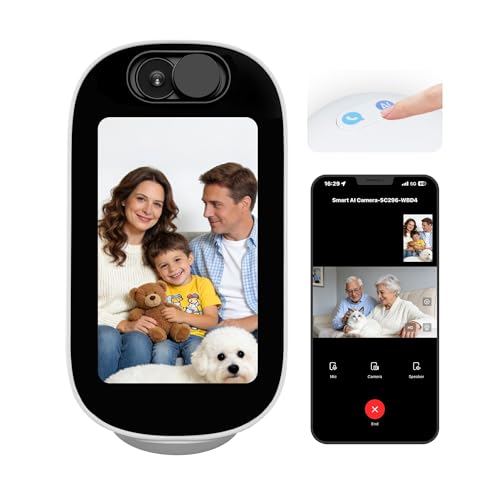
Best for: nurseries, bedrooms, and elder care where a visual monitor with a simple call feature helps stay connected. The 4-inch display turns the camera into a visible, interactive home device for quick video calls, weather checks, or photos. One-tap two-way video calling supports easy communication between rooms or with a caregiver.
Why selected: it emphasizes local, straightforward calls and room-to-room communication. Limitation: the listing notes SD card storage may be required for local capture, which isn’t included in the device itself.
KEENLUK Home Security Camera With 4.3″ Screen
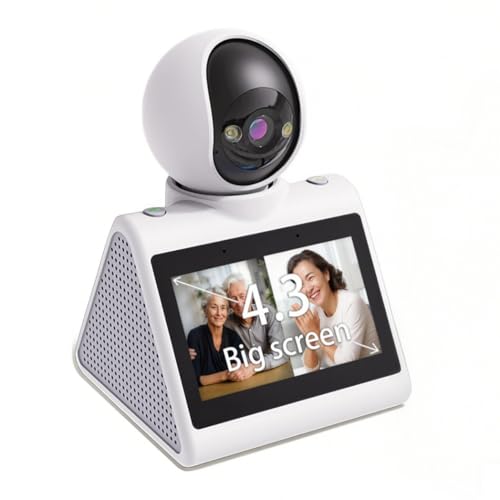
Best for: families needing close, device-to-device calls and a larger screen for easier viewing. The 4.3″ display supports two-way video calling, and the device-to-device calling feature enables real-time conversations across multiple screens. It’s ideal for checking in on kids or seniors.
Why selected: the larger display and simplified call button make it more accessible for those not comfortable with smartphones. Caution: currently supports 2.4G WiFi; compatibility with newer networks may vary.
Meta Portal TV — Big Screen Smart Video Calling
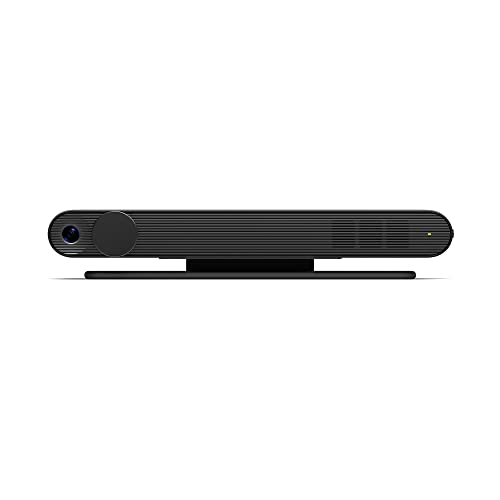
Best for: group calls and family gatherings on a living room TV. Portal TV scales conversations, capturing the whole room so everyone is seen without crowding for space. It supports calls via Messenger or WhatsApp, enabling connections even with those who don’t own Portal devices.
Why selected: a larger screen makes group chats feel more natural and immersive. Caution: placement matters for optimal camera framing; ensure a stable connection and proper lighting for best results.
Amazon Echo Show 5 — Smart Display for Video Calls
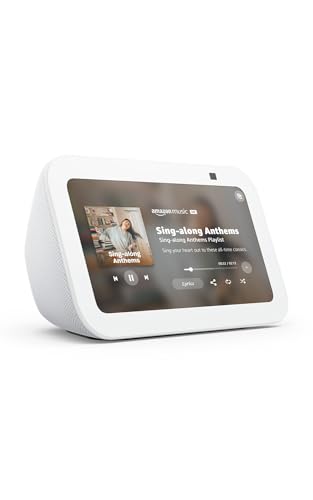
Best for: compact desks or nightstands where quick video calls, weather, news, and smart-home control are needed. The 5.5-inch display offers glanceable information, while Alexa handles video calls and compatible camera feeds.
Why selected: small footprint with strong voice assistant integration. Limitation: smaller screen means limited visibility for group calls or detailed content compared to larger devices.
ViewClix Smart Frame — Digital Frame With Video Calling

Best for: grandparents and family members who want simple, ongoing visual connection without a traditional device. It supports auto-answer video calls, remote management, and sharing photos or videos from a phone app.
Why selected: designed specifically for seniors, with straightforward controls and remote updates. Caution: requires ongoing app management and a subscription for some features after the trial period.
Buying Guide
What to consider when choosing a video calling device:
- Screen size and viewing distance — larger screens are better for group calls and remote viewing; smaller displays suit desks and bedside use.
- Camera tracking and framing — smart cameras that keep you in frame improve the calling experience when moving around.
- Ease of use — devices with one-button calling, auto-answer, or simplified menus help users less comfortable with technology.
- Voice assistant and app compatibility — consider whether you need integration with Messenger, WhatsApp, Alexa, or other services.
- Placement and room context — wall mounting, TV-based setups, or frames require thoughtful placement for optimal lighting and framing.
- Security and privacy — evaluate built-in mics/cameras controls, and whether you can disable or cover cameras when not in use.
FAQ
- Can these devices work without WiFi? Most require a network to enable video calling and app integrations.
- Which is best for seniors? ViewClix frames and KEENLUK-style devices are designed for senior usability and easy one-button calls.
- Are group calls possible? Meta Portal TV and Portal devices are designed to support multi-person conversations on larger screens.
- Do these devices work with non-smartphone family members? Yes, many support calls from non-smart devices through apps like Messenger or WhatsApp.