Answer: A VoIP phone system delivers flexible, internet-based calling suitable for homes and small offices, with features like multi-line support, extension dialing, and remote work capabilities. This guide highlights five strong options and explains who benefits most from each. The included Buying Guide covers setup, scalability, and feature trade-offs to help you choose confidently.
| Product | Best For |
|---|---|
| Ooma Telo VoIP Free Internet Home Phone Service with 3 HD3 Handsets | Small households needing a bundled hardware setup and handsets |
| Ooma Telo VoIP Free Internet Home Phone Service: Black | Cost-conscious users who want nationwide calling with value |
| magicJack VOIP Phone Adapter | Remote workers or travelers needing mobile app integration |
| Ooma Telo Air VoIP Free Internet Home Phone Service | Flexible home placement with built-in wireless for easy setup |
| Grandstream GRP2612W IP Phone | Small offices needing multiple lines and SIP accounts |
Ooma Telo VoIP Free Internet Home Phone Service with 3 HD3 Handsets

Best for: households that want an all-in-one setup with optional handsets for whole-home coverage. Ooma’s solution emphasizes a top-rated service profile and simple integration with a home network.
Why chosen: The package includes multiple handsets and leverages Ooma’s reputed service base. It’s suitable for users aiming to replace traditional phone lines with a dependable, internet-based system.
Limitation: Availability or feature depth may vary by region; ensure compatibility with your internet service and local emergency calling requirements.
Ooma Telo VoIP Free Internet Home Phone Service: Black
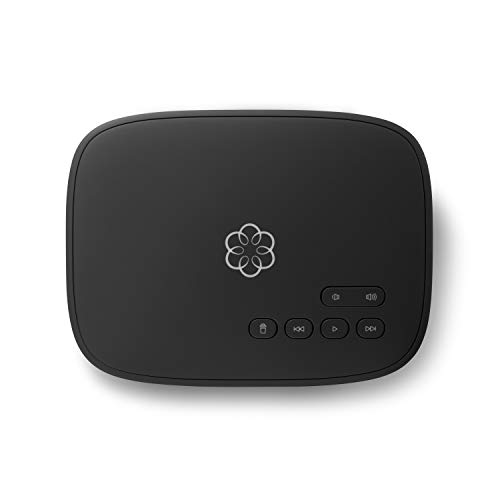
Best for: users seeking nationwide calling with low international rates and a value-focused home phone service.
Why chosen: It highlights crystal-clear nationwide calls, low international rates, and a leading consumer publication’s satisfaction ranking, making it a solid option for budget-minded homes.
Caution: Monthly taxes and fees apply in addition to base service; verify total monthly costs for your locale.
magicJack VOIP Phone Adapter

Best for: remote workers or travelers who need unlimited U.S. and Canada calling with a mobile app tie-in and no ongoing monthly bills.
Why chosen: magicJack combines unlimited domestic calling with a mobile app, enabling calls from a smartphone while syncing with a home phone line for flexibility.
Limitation: Long-term service terms and local availability vary; consider data usage and network reliability if you rely on the mobile app as a primary line.
Ooma Telo Air VoIP Free Internet Home Phone Service

Best for: homes needing flexible placement with wireless connectivity for easier installation and fewer cables.
Why chosen: Built-in wireless lets you place the base in an optimal spot and still access Ooma’s nationwide calling and added features, including compatibility with Ooma Home Security sensors.
Limitation: Wireless performance depends on your home Wi-Fi network; a wired connection might be more reliable in some setups.
Grandstream GRP2612W IP Phone

Best for: small offices needing multiple lines and SIP accounts with a Wi‑Fi option and PoE support.
Why chosen: It supports four SIP accounts and four lines, plus a color display and built-in dual-band Wi-Fi, making it a scalable choice for evolving small offices.
Caution: When enabling Wi‑Fi, an Ethernet cord may need to be disconnected to use Wi‑Fi; plan placement accordingly for best signal quality.
VTech DS6151-11 DECT 6.0 2-Line Expandable Cordless Phone

Best for: households needing extended coverage with multiple handsets and a single base connection.
Why chosen: DECT 6.0 technology minimizes interference, offering a wide range and reliable indoor coverage with up to 12 handsets supported when expanded.
Limitation: Interference risk is low but present in dense wireless environments; ensure proper channel selection for best performance.
Buying Guide
What do you need from a VoIP phone system?
Consider whether you want a simple residential setup or a scalable small-office solution. Determine if you need multiple handsets, number of lines, and SIP account support. Evaluate whether you prefer built-in wireless or wired connectivity and how that affects placement.
Key features to compare
- Lines and extensions: How many simultaneous calls or extensions are supported?
- SIP compatibility: Does the system work with your preferred SIP provider or requires the vendor’s service?
- Mobility options: Is there a mobile app or remote calling capability?
- Networking: Use of Wi‑Fi vs. Ethernet; PoE support for desk phones.
- Security and privacy: Built-in encryption, secure remote access, and privacy controls.
Setup and maintenance considerations
- Installation: Assess whether you prefer a plug-and-play system with handsets or a more complex setup with multiple SIP accounts.
- Administrative control: Look for features like call routing, voicemail management, and user permissions.
- Support and updates: Consider ongoing software updates and customer support quality.
Size and future-proofing
For homes, a straightforward, single-site setup may suffice. For small offices, plan for scalability with multiple SIP accounts, robust voicemail, and conference calling capabilities.
Connectivity and reliability
Wired Ethernet generally offers more reliable call quality than Wi‑Fi, though modern Wi‑Fi standards provide acceptable performance for many setups. Check your internet upload speed and router quality to ensure stable VOIP performance.
FAQ
- What is a VoIP phone system?
AVoIP system uses the internet to carry calls instead of traditional phone lines, often supporting multiple lines, extensions, and advanced features. - Do I need a special modem or router?
A typical broadband modem and router are sufficient, but ensure your network can handle the call load with QoS settings if available. - Can I use my existing phones with a VoIP system?
Some systems support legacy analog adapters or compatible IP phones; verify compatibility with the vendor’s documentation. - Is VoIP reliable for home use?
Reliability depends on internet stability. A wired connection and quality router usually provide the best consistency. - Are there ongoing fees beyond the base service?
Yes, depending on the provider, taxes, regulatory fees, and optional features may apply. - What should I consider when choosing between these options?
Evaluate number of lines, budget, ease of setup, mobility features, and future scalability for your needs.