Answering the need for low-latency gaming and stable online play, these WiFi extenders are designed to boost signal strength, reduce dead zones, and support multiple devices. The top picks below are best for dedicated gamers, home offices with online gaming, or households with multiple consoles and PCs. See a quick at-a-glance summary table of the five recommended models.
| Product | Best For | Why Pick It |
|---|---|---|
| TP-Link AC1200 RE315 | Small to mid-size homes | Strong coverage, simple setup, and solid dual-band speeds. |
| TP-Link AC1900 RE550 | Mid-range networks | Higher total bandwidth, more antennas for coverage. |
| JoyLantern AX3000 | Large homes, many devices | WiFi 6 technology with high capacity and long range. |
| TP-Link AX3000 RE715X | Performance-focused setups | WiFi 6 with strong throughput and robust security. |
| TP-Link BE3200 RE223BE | WiFi 7 future-ready | Next-gen tech, broad coverage and high device support. |
TP-Link AC1200 WiFi Extender RE315: Solid Everyday Coverage

The TP-Link RE315 is a dual-band extender that delivers up to 1600 Mbps total bandwidth, using 867 Mbps on the 5 GHz band and 300 Mbps on the 2.4 GHz band. Its Adaptive Path Selection and One-Touch Connection simplify setup and provide reliable coverage for typical gaming consoles, PCs, and streaming devices. Best for gamers in small to midsize homes who want an affordable upgrade without sacrificing easy installation.
Best for: gamers with a moderate number of devices and a single living area or apartment layout. Why selected: reliable dual-band speeds and straightforward setup with broad compatibility.
Caution: performance varies with distance from the primary router and physical obstacles like walls or floors with many devices sharing bandwidth.
TP-Link AC1900 RE550: Higher Throughput For Gaming

The RE550 extends networks with dual-band speeds up to 1300 Mbps on 5 GHz and 600 Mbps on 2.4 GHz, supporting up to 32 devices. It uses three external antennas for improved coverage and stability, making it a solid choice for mid-sized homes with gaming consoles, PCs, and smart devices. Best for: gamers who need more bandwidth and a steadier link than entry-level extenders. Why selected: stronger overall bandwidth and better antenna design for reliable gaming sessions.
Caution: actual speeds depend on router capabilities and environmental interference; place the extender halfway between router and gaming area for best results.
JoyLantern AX3000: WiFi 6 For Large, Busy Homes

The JoyLantern AX3000 extender leverages WiFi 6 to deliver up to 2400 Mbps on 5 GHz and 600 Mbps on 2.4 GHz. It supports more than 150 devices simultaneously, helping reduce congestion in busy homes with multiple gaming PCs, consoles, and IoT devices. Best for: households with many connections and heavy gaming use across multiple rooms. Why selected: high device capacity and lower latency due to WiFi 6 efficiency. Caution: larger homes may require optimal placement to maximize coverage.
TP-Link AX3000 RE715X: Strong WiFi 6 Range Extender

The RE715X is a dual-band WiFi 6 extender with up to 2594 Mbps on the 5 GHz band and 688 Mbps on the 2.4 GHz band. Four high-gain antennas with Beamforming extend coverage and strengthen connections for up to 64 devices, making it a robust option for gaming rooms and home theaters. Best for: performance-focused gamers who need solid throughput and broader coverage. Why selected: strong WiFi 6 performance and security features for a growing smart-home setup.
Caution: real-world speeds can vary by wall materials and network load; optimal placement between router and game area is important.
TP-Link BE3200 RE223BE: WiFi 7 Ready Range Extender
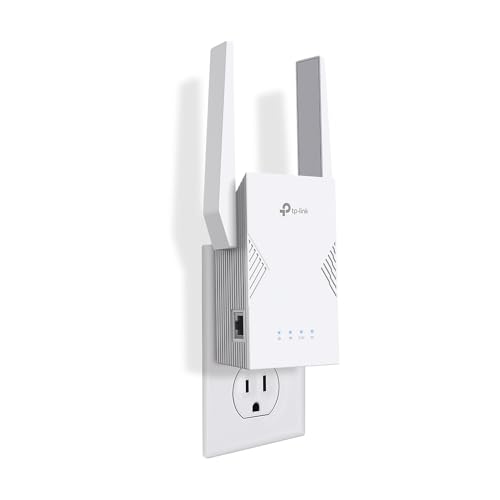
The BE3200 RE223BE offers WiFi 7 compatibility with Multi-Link Operation (MLO) and up to 2400 Mbps on 5 GHz with 688 Mbps on 2.4 GHz, plus EasyMesh for scalable networks. It’s designed to distribute signal more evenly, which can benefit gaming setups that require fast, stable connections across larger homes. Best for: future-proofed networks and gamers planning expansion. Why selected: next-generation tech and broad device support. Caution: real-world benefits depend on router compatibility and practical deployment of MLO within your home.
Buying Guide: Key Purchase Considerations
- What coverage area do I need? Browse extenders with square-foot coverage that fits your home’s size and wall layout. Larger homes require models with higher antenna gain and multiple devices support.
- Is WiFi 6 or WiFi 7 beneficial for gaming? For busy households or multiple simultaneous connections, WiFi 6 and 7 offer better efficiency, lower latency, and higher device capacity than WiFi 5.
- Should I choose a unit with Ethernet ports? If you game on a PC or console requiring a strong wired link, Ethernet ports provide the most stable connection and reduce wireless interference.
- How many devices will share the network? If you have many gaming consoles, PCs, TVs, and smart devices, prioritize extenders with high device capacity and Beamforming.
- How important is security? Look for extenders that align with strong security practices and regular firmware updates from reputable brands.
Frequently Asked Questions
- Do I need an extender for gaming if I already have a fast router? An extender can help reach far rooms or eliminate dead zones, potentially improving latency where the router signal weakens.
- Is it better to buy a mesh system instead of an extender for gaming? Mesh systems provide seamless coverage but may be more expensive. Extenders are a cost-effective upgrade for specific dead zones.
- Can I use a wired Ethernet port on an extender for gaming consoles? Yes. A wired port provides a stable, low-latency connection ideal for gaming.
- Will WiFi 6 or WiFi 7 extenders reduce latency more than WiFi 5? Yes, WiFi 6/7 technologies improve efficiency and capacity, which can reduce wireless contention and lag in busy networks.
- How should I place an extender for best gaming performance? Place it midway between the router and the gaming area, avoiding obstructions and interference from appliances or metals.
- Do extenders slow down overall internet speed? They can reduce speed slightly compared to a direct router link; a well-placed extender minimizes this drop while extending coverage.