Answering the common buyer question: which wired controller should you choose for PC gaming? This guide highlights five solid options for Windows 10/11 and PC gaming, each suited for different needs—from broad compatibility and plug‑and‑play setup to advanced triggers and durability. Whether you want Xbox-style precision, hall‑effect sticks, or back‑mapping features, there’s a wired PC controller here to match your playstyle and setup.
Summary of selected products:
| Product | Brand | Best For | Notes |
|---|---|---|---|
| PowerA Wired Controller for Xbox Series X|S | PowerA | Casual players and Windows 10/11 users | Long USB‑C cable; dual rumble; responsive triggers |
| GameSir G7 SE Wired Controller | GameSir | Hall effect precision and PC/console mix | Hall joysticks/triggers; plug‑and‑play |
| Logitech F310 Wired Gamepad | Logitech | Reliable, familiar layout for many games | Software programmable for non‑native support |
| IFYOO V‑one Wired USB Controller | IFYOO | Broad OS/Android compatibility | OTG capable; Windows XP/7/8/10/11 support |
| RivalPlay Wired Controller for PC | RivalPlay | Customizable mappings and adjustable vibration | Back‑buttons and turbo options |
PowerA Wired Controller for Xbox Series X|S

The PowerA wired pad emphasizes a straightforward, reliable PC and Xbox setup. It includes Dual Rumble Motors for tactile feedback and immersive impulse triggers to simulate in‑game action. The extra‑long USB‑C cable (10 ft) boosts reach and flexibility for couch play or desk setups. This model is best for players who want a familiar Xbox‑style layout with dependable wired performance and extended cable length.
Best for: Casual gamers and Windows 10/11 users who want a plug‑and‑play Xbox‑style controller with long cable reach. Avoid if you require advanced back buttons or hall sensors.
GameSir G7 SE Wired Controller

The GameSir G7 SE offers versatile compatibility with Xbox Series X|S, Xbox One, and Windows PC. It features Hall effect joysticks and triggers for long‑lasting precision and reduced drift, along with a plug‑and‑play wired USB setup that minimizes driver needs. The controller is a strong choice for players who want highly accurate controls and a seamless PC or console experience without complex setup.
Best for: PC players who value precision and durability, plus a straightforward plug‑and‑play experience. Better for those who want hall sensors and a comfortable feel; choose this if you play a lot of precise shooter or racing titles. Caution: wired only, no wireless option on this model.
Logitech G F310 Wired Gamepad

The Logitech F310 is a classic wired gamepad with broad game support and a familiar layout. It supports a traditional Xbox‑style button set and is compatible with many PC titles. Its profiler software allows programming for games that do not natively support gamepads. This model is suitable for players who want reliability and easy setup across a wide library, including older titles that may lack native controller support.
Best for: Players seeking broad compatibility and an approachable setup for a wide range of games. Caution: software programming requires installing the profiler software on PC; not ideal if you dislike driver or software steps.
IFYOO V-one Wired USB Controller
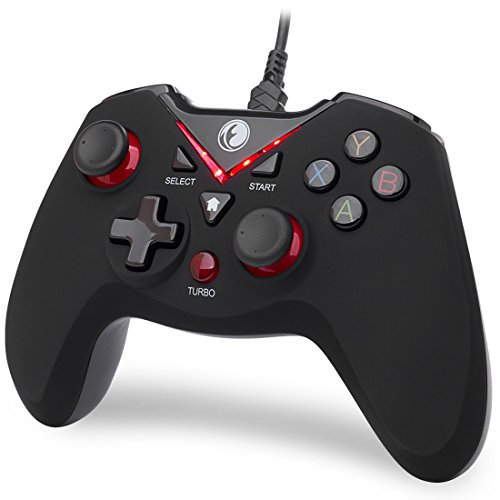
The IFYOO V‑one focuses on broad compatibility with PC (Windows XP/7/8/10/11) and Android via OTG, including Steam and PS3 support. It emphasizes plug‑and‑play use with Xinput games, offering a practical option for older systems and mixed device setups. Best for: Players who need a budget‑friendly, widely compatible wired controller that works across PC and select Android devices. Limitation: not ideal for FPS games that demand precise, rapid input responsiveness.
RivalPlay Wired Controller for PC

RivalPlay focuses on customization with two programmable back mapping buttons and adjustable vibration levels (30%, 70%, 100% or off). It also includes a turbo function with multiple speed settings. This makes it well suited for players who want quick access to complex commands and a tailored vibration profile for different game genres. Best for: Hardcore PC gamers who value back‑mapping, tuning vibration, and turbo for rapid actions. Limitation: features rely on included software or on‑controller programmable options that may vary by game.
Buying Guide
What should you consider when choosing a wired PC controller?
- Compatibility: Check PC and OS support, including Windows 11/10, Steam, and any console cross‑compatibility you need.
- Input technology: Hall effect sticks/triggers offer greater durability and precision, while standard analog controls suit casual play.
- Wired length: A longer USB cable helps with couch setups or desks far from the PC; measure your space before buying.
- Programmable features: Back buttons, mapping, and turbo modes can speed up complex actions in certain games.
- Software dependencies: Some controllers require companion software for profiling or button mapping; consider your comfort with setup complexity.
- Ergonomics: Grip texture, weight, and comfort matter for long sessions and genres you play most (FPS, racing, platformers).
FAQ
- Are wired PC controllers better than wireless for competitive gaming?
– Wired connections reduce input lag and avoid battery management concerns, which can matter in fast‑paced titles. - Do all wired controllers work with Windows 10/11 without drivers?
– Many offer plug‑and‑play with basic functionality; some may require drivers or software for full features. - Can I use Xbox‑style controllers on PC for Steam games?
– Yes, most Xbox‑style wired controllers work with Steam and many non‑Steam titles via XInput. - What is the benefit of hall effect sticks?
– Hall effect sensors reduce wear and drift, offering longer life and consistent precision. - Should I choose back‑mapping on a wired controller?
– Back‑mapping is useful for macro commands in complex games and for accessibility, but may require software support.