Looking for a reliable wireless computer mouse that fits your everyday tasks or gaming needs? This guide highlights five top picks that cover ambidextrous comfort, gaming speed, travel-friendly design, quiet clicking, and budget-friendly options. Whether you’re shopping for a right- or left-handed user, a laptop traveler, or a desktop creator, these mice are chosen for clear compatibility, dependable battery life, and practical features.
Buyer profiles: budget-conscious shoppers who want solid everyday performance; gamers seeking precision and fast response; professionals who value comfort for long work sessions; students needing compact, portable options; and multi-device users who benefit from universal compatibility. The table below summarizes the five selected models and their key strengths.
| Product | Best For | Why It Stands Out |
|---|---|---|
| Logitech M185 Compact Ambidextrous (Swift Grey) | All-day general use | Ambidextrous shape, up to 1-year battery life, universal compatibility |
| Logitech G305 Lightspeed Wireless Gaming Mouse | Game performance | HERO sensor, 1 ms report rate, long battery life in Endurance mode |
| Logitech M510 Full Size Ambidextrous | Ergonomic daily productivity | Contoured grip, multiple programmable buttons, long battery life |
| Logitech M185 (Blue) Compact Ambidextrous | Budget-friendly daily use | Compact ambidextrous design, easy setup, reliable wireless connection |
| Amazon Basics 2.4 GHz Wireless Optical Mouse | Simple, affordable wireless option | Nano receiver that stows away, solid 2.4 GHz connection |
Logitech M185 Compact Ambidextrous 2.4 GHz Wireless Mouse

Best for: everyday computing and left- or right-handed users. This compact Logitech mouse emphasizes comfort with an ambidextrous shape, a reliable 2.4 GHz wireless connection, and a long battery life claim of up to a year thanks to smart sleep mode. It’s a practical pick for students, home offices, and anyone who uses a laptop or desktop with standard USB receivers. Limitation: battery life can vary with heavy usage or high-DPI tasks.
Logitech G305 Lightspeed Wireless Gaming Mouse

Best for: gamers seeking high precision and fast response. The G305 uses the HERO sensor with up to 12,000 DPI, ultra-fast LIGHTSPEED wireless, and a 1 ms report rate for competitive play. It can run for extended periods on a single AA battery, and Endurance mode extends life further. Caution: small size may feel less comfortable for users with larger hands over long sessions.
Logitech M510 Full Size Ambidextrous Wireless Mouse

Best for: long work sessions and productivity tasks. The M510 offers an ergonomic, comfortable contour with soft grips and a broad palm area. It includes extra buttons and horizontal scrolling, and the On/Off switch with smart sleep helps save battery life. Limitation: software-dependent features may require SetPoint or related utilities on Windows or Mac to enable full customization.
Logitech M185 Compact Ambidextrous Wireless Mouse With Rubber Grips
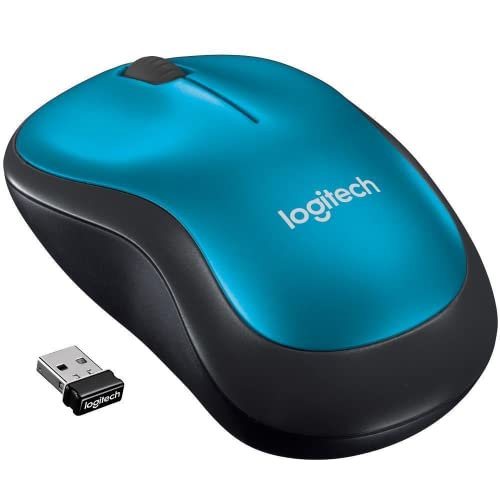
Best for: budget-minded buyers who still want ambidextrous comfort. This variant provides rubber grips and a compact profile, retaining the core benefits of the M185 line. Best for: everyday use, students, and travel. Limitation: basic feature set compared to higher-end Logitech mice.
Amazon Basics 2.4 GHz Wireless Optical Mouse

Best for: straightforward wireless use without extra frills. The Amazon Basics mouse uses a nano receiver that stays in the PC or tucks into the mouse. The 2.4 GHz connection is designed for reliability in everyday tasks. Caution: features are minimal; not ideal for users who want programmable buttons or high DPI control.
Buying Guide
What should you consider when choosing a wireless computer mouse?
- Grip and size: Ambidextrous shapes suit both hands but test for palm size and finger reach. For long sessions, an ergonomic contour helps reduce fatigue.
- Sensor and DPI: Gaming mice offer high DPI and precision sensors; consider DPI range, polling rate, and acceleration if you do precise design or fast gameplay.
- Connectivity: 2.4 GHz wireless offers strong reliability with a USB receiver. Bluetooth is not necessary for all, but can reduce USB port usage on laptops.
- Battery life: Long battery life minimizes interruptions. Some models support switching modes to extend life, while others rely on AA or rechargeables.
- Buttons and customization: Programmable side buttons can boost productivity. Some models require software to customize functions.
- Software dependencies: Certain features may need driver/software (Windows/macOS); confirm compatibility with your OS.
- Portability: Travel-friendly, compact mice fit into bags easily but may trade off comfort for extended work sessions.
Quick comparison by use case
- Everyday computing: Logitech M185 variants, Amazon Basics mouse — reliable and simple.
- Productivity and scrolling: Logitech M510 — extra buttons and comfortable for long workdays.
- Gaming: Logitech G305 — precision, low latency, high performance in compact form.
- Quiet work environments: Some Logitech silent models reduce clicking noise (check specific variants).
FAQ
- What is the main advantage of a wireless mouse?
By avoiding cords, wireless mice reduce desk clutter and offer flexible placement. - Do wireless mice require software to work?
Most work plug-and-play, but some models offer advanced customization via software. - Is Bluetooth or a USB receiver better for a wireless mouse?
USB receivers offer reliable, low-latency connections on desktops; Bluetooth can free a USB port on laptops. - How long do batteries last on wireless mice?
Battery life varies by model and usage; some advertise up to a year with smart sleep features. - Can I use a wireless mouse with a Mac or Windows PC?
Yes, most modern wireless mice are cross-platform, but some features may require software on Windows or macOS. - What DPI should I choose for precise design work?
Higher DPI is useful for high-precision tasks; start around 800–1600 DPI and adjust as needed.