Discover the best wireless keyboards with touchpads designed for TV-connected PCs, HTPC setups, and desktop use. This guide highlights five solid options, focusing on usability, compatibility, and value. Ideal buyers include: media-center users needing easy navigation from the couch, multi-device users seeking seamless switching, and compact setups where a keyboard-mouse combo is impractical.
| Product | Best For |
|---|---|
| Logitech K400 Plus Wireless Touch TV Keyboard | TV-connected PCs and living room setups |
| Arteck Universal Backlit Bluetooth Touch TV Keyboard | Backlit convenience and multi-OS use |
| Bnnwa Multi-Device Wireless Bluetooth Keyboard with Touchpad | Multi-device switching and portability |
| Arteck 2.4G Wireless Touch TV Keyboard with Built-in Touchpad | Tethered USB-receiver setups in living rooms |
| Fosmon Mini Keyboard with Touchpad | Bluetooth + 2.4 GHz versatility for various streaming devices |
Logitech K400 Plus Wireless Touch TV Keyboard

The Logitech K400 Plus combines a compact keyboard with an integrated touchpad, designed for PC-to-TV entertainment control. It operates via a Unifying receiver for plug-and-play setup and offers long battery life up to 18 months with an on/off switch. It is best for couch-based navigation and media control where a full keyboard and mouse are impractical. Limitation: its built-in trackpad favors simple cursor tasks over precision editing.
Arteck Universal Backlit Bluetooth Touch TV Keyboard

This Arteck keyboard offers seven-color backlighting and broad compatibility across Windows, Mac, Android, iOS, Chrome OS, and TV-connected devices. It’s a strong pick for users who value visibility in dim rooms and cross-platform versatility. Pay attention to battery life in backlight mode, which may reduce uptime. Best for users who want a backlit, versatile remote-like keyboard for mixed devices.
Bnnwa Multi-Device Wireless Bluetooth Keyboard with Touchpad

The Bnnwa keyboard supports three devices and offers a 33-foot range with a built-in touchpad for easy navigation. It’s well suited for users who frequently switch between a computer, tablet, and smartphone. A potential limitation is that the keyboard design prioritizes compactness, which may reduce comfortable typing for long sessions compared to full-sized layouts.
Arteck 2.4G Wireless Touch TV Keyboard

This Arteck model uses a 2.4 GHz USB receiver for straightforward hookup to TV-connected computers or HTPCs, with a built-in touchpad and media keys. Its wireless range supports large rooms, making it suitable for living-room setups with seating far from the TV. Limitation: USB receiver compatibility may vary across older devices.
Easytone Backlit Mini Wireless Keyboard
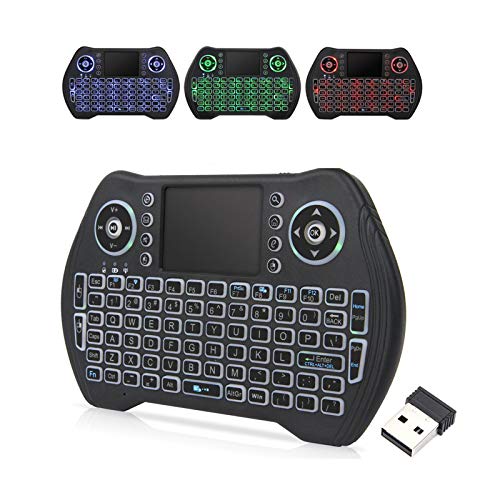
The Easytone mini keyboard blends a touchpad with a compact design and a rechargeable battery. It supports multiple devices via USB, 2.4 GHz, and Bluetooth connections and features backlighting for night use. Choose this if you value a compact form factor with backlit keys and rechargeable power, but note that its small layout might slow typing for some users.
Buying Guide
What should you look for when choosing a wireless keyboard with a touchpad?
- Connection type: Decide between Bluetooth, 2.4 GHz dongle, or USB receiver. Bluetooth supports multi-device pairing, but may introduce pairing latency on busy networks.
- Device compatibility: Confirm OS support (Windows, Mac, Android, iOS) and whether it works with your TV, HTPC, or streaming box.
- Built-in backlighting: If you watch in dim rooms, backlit keys improve visibility. Check battery impact if you plan long sessions.
- Typing comfort and layout: Full-size keyboards offer better typing comfort; compact models save space but may reduce precision for long work.
- Touchpad quality: Consider size, gesture support, and precision for navigation tasks like scrolling and multi-finger gestures.
Practical tips
- For couch setups, prioritize a long-range wireless connection and a responsive touchpad rather than the most compact form.
- Test compatibility with your primary display device before committing to a model.
- If you switch devices often, choose a model that supports multiple connections and easy switching.
FAQ
- Q: Do these keyboards work without a computer? A: Most require a connected device that supports USB or Bluetooth; some TVs or streaming boxes may need a supported OS or app.
- Q: Is a backlit keyboard worth it for a bright living room? A: Backlit keys are most beneficial in low-light environments or when you use the device from a distance.
- Q: Which is best for a Raspberry Pi setup? A: Models with USB receivers and a comfortable key layout tend to work well with Raspberry Pi projects.
- Q: Can I use these keyboards with multiple devices simultaneously? A: Some models support multi-device pairing; check the product description for the exact switching method.
- Q: Are the touchpads accurate for precise cursor control? A: Most touchpads are sufficient for navigation and scrolling, but not ideal for detailed editing tasks.
- Q: Do these keyboards require line-of-sight? A: Most use wireless signals that do not require line-of-sight, but obstacle-heavy environments can impact range.