Answering the demand for expansive, high-quality displays, this guide highlights top laptop screen extenders and portable triple-monitor setups that expand work and creative space. Ideal for remote workers, students, designers, and traders, these options boost productivity by increasing screen real estate without bulky additions. The selections prioritize clear FHD or higher IPS panels, wide viewing angles, eye comfort features, and easy plug-and-play setups. Read on to find the best fit for your workflow and travel needs.
| Product | Brand | Key Benefit | Best For |
|---|---|---|---|
| Vixtan 14″ Triple Laptop Screen Extender | Vixtan | Ultra-light triple-screen workspace | Remote workers and travelers needing maximum portability |
| SMISEACOW Triple Laptop Screen Extender 15.6″ | SMISEACOW | Plug-and-play triple display with carry bag | Professionals on the go who value easy setup |
| KEFEYA Laptop Screen Extender 15.6″ | KEFEYA | Heavy-duty aluminum build with wide color gamut | Designers and traders needing accurate visuals |
| Venraty Upgraded Detachable 15.6″ Extender | Venraty | Detachable screens and flexible angles | IT and frequent travelers seeking modularity |
| 15.6″ One-Cable Laptop Screen Extender | Redalf | Driver-based, ultra-slim triple screen | Users comfortable with initial driver setup |
Vixtan 14-Inch Triple Screen Extender

Best for: Remote workers and digital nomads who need the lightest possible triple-screen setup. This model weighs about 3.0 lbs and is 0.3 inches thick, making it easy to travel with. It supports extended, mirrored, and portrait modes, enabling versatile workflows for traders or developers who multitask across dashboards and tools. The 14-inch IPS panel provides 1920×1080 resolution with 178-degree viewing angles. A potential limitation is that the triple display may require multiple USB-C connections, depending on the laptop’s outputs.
SMISEACOW Triple 15.6-Inch Screen Extender
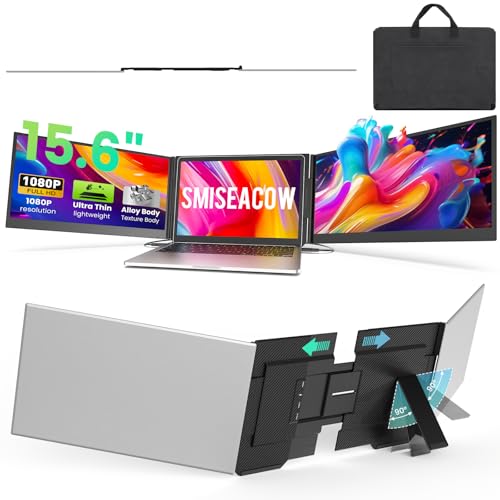
Best for: Professionals who value a true 15.6″ triple-screen workspace on the go. It uses a 15.6″ FHD IPS panel with 300 nits brightness and a 1000:1 contrast ratio. It comes with a soft leather carry bag for travel. It supports plug-and-play via USB-C or USB-C+HDMI and is ideal for people who want immediate multi-monitor capabilities without driver setup. A caution: some laptops may need a second video output or an adapter if dual outputs aren’t available.
KEFEYA 15.6″ FHD Triple Screen Extender
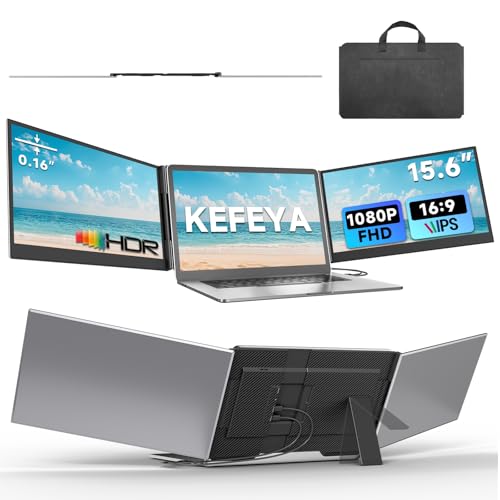
Best for: Designers and traders who need accurate colors and robust construction. This unit weighs 3.9 lbs and features a 0.16″ ultra-slim profile with aviation-grade aluminum for heat dissipation. It offers a wide color gamut (1920×1080, 100% sRGB) and a 178-degree viewing angle. It ships with a leather bag for portability. Limitation: It’s a triple-screen extender that relies on external power and compatible output ports, so verify your laptop’s ports before purchase.
Venraty Upgraded Detachable 15.6″ Extender

Best for: IT professionals and frequent travelers who value modular, detachable screens and flexible viewing angles. The set includes two extra screens with 90°, 235°, and 360° rotation options. It uses a 1080p IPS panel with 300 nits brightness and a 1000:1 contrast ratio, plus built-in speakers. A caveat: detachable screens add some assembly steps and hinge management compared with fixed triples.
Redalf 15.6-Inch One-Cable Extender

Best for: Users who prefer quick setup with minimal cabling and a straightforward driver install. This model uses a single USB-C or USB-A connection after a driver install to create a triple-screen workspace. It offers 178-degree viewing angles, 15.6″ FHD panels, and anti-glare with low blue light. Limitation: Initial driver installation is required, which may be a step some users want to avoid.
Buying Guide: How To Choose The Right Laptop Screen Extender
- Display size and resolution: Choose 15.6″ or 14″ options for a balance of portability and workspace. Look for IPS panels with 1080p or higher and wide viewing angles for consistent color and clarity.
- Weight and portability: If travel is a big factor, prioritize ultra-slim, light designs (under 4 lbs) with protective carrying bags.
- Connectivity: Check that your laptop has compatible USB-C/HDMI ports. Some extenders require two video outputs or a driver for first-time setup.
- Setup style: Decide between fixed triple displays, detachable modules, or single-cable plug-and-play. Detachable designs offer modular flexibility, while fixed triples simplify use.
- Eye comfort: Look for anti-glare, low blue light, and high brightness (colloquially 300 nits or more) to reduce eye strain during long sessions.
- Color accuracy: For designers and color-critical work, prioritize IPS with ~100% sRGB coverage and stable color representation across angles.
- Build quality: Aluminum alloys and sturdy stands provide durability and better heat dissipation, especially for longer work sessions.
Frequently Asked Questions
- Do you need drivers to use a laptop screen extender?
Some models are plug-and-play with no drivers, while others require an initial driver installation to enable the triple-screen mode.
- Will all laptops support triple-screen extenders?
Most laptops with multiple video outputs or USB-C with DP Alt Mode can support triple displays, but check port availability and power requirements.
- Is a detachable triple monitor better than a fixed one?
Detachable designs offer flexibility for travel and custom configurations, while fixed triples provide a consistent desk setup with less assembly.
- What should I consider for eye comfort?
Look for anti-glare surfaces, low blue light technology, and sufficient brightness to reduce eye strain during extended use.
- Can these extenders replace a primary monitor?
They are typically used as supplementary displays. For color-critical work, verify color accuracy and calibration options, as these extenders are often not primary-grade monitors.