The best budget gaming desktop options deliver solid 1080p performance, upgrade paths, and reliable components without breaking the bank. This guide highlights five solid choices aimed at different types of buyers—from casual gamers to students on a tight budget and enthusiasts who want more room to upgrade. Each pick is evaluated for who it’s best for, why it’s chosen, and any notable limitations.
Summary table of selected products:
| Product | Best For | Main Strength | Limitations |
|---|---|---|---|
| HP RGB Gaming Desktop (Renewed) | Budget-conscious buyers who want Windows Pro | Solid RAM and SSD with a familiar brand | Older GPU may limit new releases |
| STGAubron Gaming PC (i7, RX 580) | Mid-range gamers wanting higher FPS | Strong CPU/GPU combo with 1TB SSD | Newer titles may demand tweaks for max settings |
| STGAubron Core i7 (RTX 2060) | Performance-focused shoppers | RTX 2060 and 16GB RAM for modern titles | Higher power draw |
| Suevery Prebuilt Gaming PC | RGB-loving setup on a budget | 6-core Ryzen with RX 560 and 16GB | Graphics card entry-level for newer titles |
| CyberPowerPC Ryzen 5 / RX 6500 XT | Value seekers who want modern tech | Newer GPU in capable build | 8GB RAM may limit heavy multitasking |
HP RGB Gaming Desktop Renewal

Best for budget buyers who want Windows 11 Pro and a balance of speed and storage at a low upfront cost. This HP system combines a quad-core Intel processor, 16GB of DDR4 memory, and a 512GB SSD, making it suitable for entry-level gaming and general productivity. The included Wi-Fi 6 and Bluetooth 5.0 support smooth wireless connectivity, with the GTX 750 Ti offering modest modern-titles performance. Caution: GPU is older; expect lower frame rates on newer, demanding titles at high settings.
STGAubron Gaming PC Desktop (i7, RX 580 8G)

Best for gamers who want higher frame rates in a broad library of games without breaking the bank. This STGAubron model pairs an Intel Core i7 up to 3.9GHz with an 8GB RX 580 and a 1TB SSD, offering robust multitasking and ample storage. It’s well-suited for 1080p play at high or very high settings in many titles. Limitations: RX 580 is older by current standards and may struggle with the latest generation games at the highest settings.
STGAubron Core i7 with RX 580 (512G SSD)

Best for users who want a capable 1080p setup with a strong CPU and decent storage. This STGAubron configuration features an Intel Core i7 up to 3.9GHz, 16GB RAM, and a 512GB SSD with Windows 11 Home. It’s a good fit for gaming, home office, and light content creation. Caution: 512GB SSD may fill quickly with modern game sizes; consider additional storage in the future.
Suevery Prebuilt Desktop (Ryzen 5, RX 560)

Best for RGB enthusiasts who want a balance of performance and visuals on a budget. The 6-core Ryzen 5 with RX 560, 16GB RAM, and a 512GB M.2 NVMe SSD offers smooth multitasking and capable 1080p gaming. It includes built-in RGB lighting and Wi-Fi 6 for a polished setup. Limitation: RX 560 is an older GPU; expect reduced performance on very new titles at high settings.
OKAMUS Pre-Built PC (i5, 256GB M.2)

Best for budget buyers who need a compact, upgrade-friendly system for 1080p gaming and everyday tasks. This OKAMUS model uses a capable i5 processor, 8GB RAM, a 256GB M.2 drive, and Windows 11 Home with Wi-Fi 6 + Bluetooth 5.3. It’s a compact option with RGB fans for improved cooling. Caution: 8GB RAM may limit heavy multitasking; consider upgrading RAM for future-proofing.
CyberPowerPC Ryzen 5 5500 / RX 6500 XT
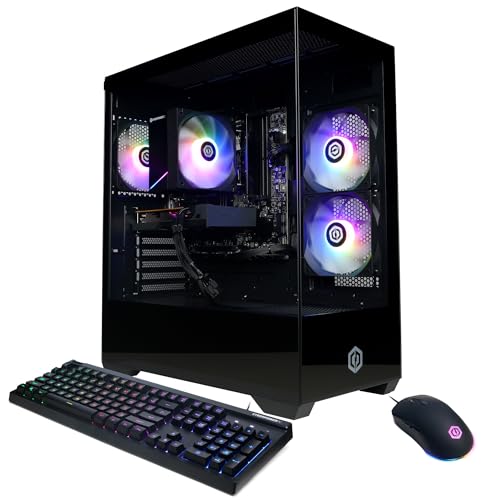
Best for buyers seeking a modern entry-level gaming PC with a newer GPU. The Ryzen 5 5500 paired with RX 6500 XT 4GB delivers solid 1080p performance in many titles, plus a 500GB NVMe SSD for faster load times. It includes Windows 11 Home and Wi-Fi, with a balanced 8GB RAM. Limitation: The RX 6500 XT may struggle with ultra settings on newer titles; upgrade RAM if multitasking heavy workloads are expected.
Buying Guide: Key Considerations for Budget Gaming Desktops
- What resolution and settings will you target? If 1080p at high or medium-high settings is enough, most listed options will perform well with a suitable GPU.
- Upgrade paths: Check if the case has available slots for RAM, storage, and a larger GPU in the future. Many budget builds offer straightforward upgrades.
- CPU-GPU balance: Aim for a balance between processor speed and graphics capabilities to avoid bottlenecks in gaming.
- Storage needs: 512GB SSDs fill quickly with modern games; consider models that support additional SSDs or HDDs for extra space.
- RAM considerations: 8GB is minimal for modern gaming; 16GB is typically recommended for a smoother experience and better multitasking.
- Ports and connectivity: Ensure USB, HDMI/DisplayPort outputs, and network options (Wi-Fi 6 or 5, Bluetooth) meet your peripheral needs.
- Reliability and warranty: Prebuilt systems from reputable brands provide easier support paths when needed.
Frequently Asked Questions
- What is the best budget gaming desktop for 1080p gaming?
– Many options in this list support solid 1080p performance, especially those with mid-range GPUs like RX 580 or RTX 2060, paired with ample RAM and SSD storage. - Should I prioritize a newer GPU or more RAM in a budget build?
– A balanced approach is best: 16GB RAM helps multitasking, while a capable GPU prevents bottlenecks in modern games. - Is an older GPU still viable for gaming?
– Yes for casual to mid-range titles at lower to medium settings; expect reduced performance on newer, demanding games. - Do I need Windows 11 for gaming?
– Windows 11 is common in newer builds and supports latest features and security; Windows 10 remains viable but may miss some optimizations. - Can these desktops be upgraded later?
– Most budget desktops offer upgrade paths for RAM, storage, and sometimes GPU; check the case’s expansion options first.