Looking for a complete Raspberry Pi kit that fits your skill level and project goals? This guide highlights five solid starter kits, with clear notes on who each is best for and why. Whether you’re teaching kids, prototyping a home project, or exploring Linux and coding, these kits offer essential components and ready-to-use configurations. The top picks prioritize reliability, included accessories, and ease of setup to help you start fast and stay productive.
| Product | Best For | RAM / Capacity | Why It Stands Out |
|---|---|---|---|
| CanaKit Raspberry Pi 4 4GB Starter PRO Kit | General projects and learning | 4GB | Solid mid-range Pi 4 with preloaded microSD and cooling |
| CanaKit Raspberry Pi 5 Starter Kit PRO – Turbine Black (128GB Edition) | Performance-minded projects | 8GB | Newest Pi 5, larger preloaded storage, robust case |
| CanaKit Raspberry Pi 3 B+ with Premium Case | Budget-friendly experiments | 1GB | Older model with solid basics and reliable power supply |
| CanaKit Raspberry Pi 5 Essentials Starter Kit | Beginner to intermediate Pi 5 users | 4GB | Compact starter set for Pi 5 ecosystems |
| RasTech Raspberry Pi 5 8GB Kit (Vemico) | Enthusiasts needing extra accessories | 8GB | Includes active cooler and 64GB card; high compatibility |
CanaKit Raspberry Pi 4 4GB Starter PRO Kit

The CanaKit Raspberry Pi 4 4GB Starter PRO Kit centers on the Raspberry Pi 4 Model B with 4GB RAM, a fast 1.5GHz 64-bit quad-core CPU, and a preloaded 32GB EVO+ microSD card. It includes a USB microSD card reader, a premium high-gloss Pi 4 case with an integrated fan mount, and a low-noise bearing system fan. Best for beginners and educators who want a reliable, all-in-one learning setup. Caution: no built-in HDMI switch; use the included fan for longer tasks to avoid throttling.
CanaKit Raspberry Pi 5 Starter Kit PRO – Turbine Black (128GB Edition)

The Pi 5 Starter Kit PRO combines Raspberry Pi 5 with 8GB RAM and a 128GB microSD preloaded with 64-bit Raspberry Pi OS. It comes in a Turbine Black Case and includes a USB microSD card reader. Best for users pursuing higher performance and more installed storage for multimedia projects or software experiments. Choose this if you need faster CPU/GPU performance; avoid if you’re budget-constrained or working with older peripherals that require Pi 4 compatibility.
CanaKit Raspberry Pi 3 B+ with Premium Case and 2.5A Power Supply
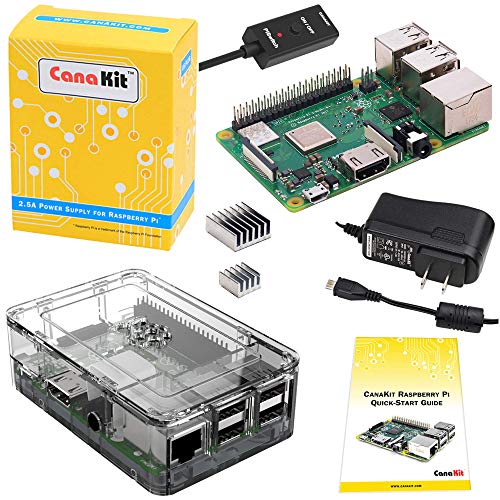
The Raspberry Pi 3 B+ kit focuses on affordability while delivering solid performance with a 1.4 GHz quad-core processor and 1 GB RAM. It includes a 2.5A power supply with a noise filter and a dual-band wireless LAN interface. Best for budget projects and classrooms that require multiple units; better for basic experiments and learning Linux basics. Limitation: older hardware means slower performance on heavier tasks compared to Pi 4 or Pi 5.
CanaKit Raspberry Pi 5 Essentials Starter Kit

The Pi 5 Essentials Starter Kit is designed for new Pi 5 users who want a compact, go-to setup with the essentials. It includes a 4GB RAM Pi 5 and a practical mix of accessories for immediate experimentation. Best for learners and makers who want a ready-to-go solution without extra frills. Limitation: may lack some advanced peripherals needed for complex robotics projects; consider adding sensors separately as needed.
RasTech Raspberry Pi 5 8GB Kit (Vemico)

The RasTech Pi 5 8GB Kit includes a Pi 5 board with 8GB RAM, a 64GB microSD card, 2 card readers, an active cooler, and a case, plus a GaN power supply and 4K display cable options. Best for enthusiasts who want robust performance and a comprehensive cooling solution. Choose this if you plan graphics-heavy projects or multitasking; avoid if you only need a lightweight starter for basic coding.
Buying Guide
What should you consider when selecting a Raspberry Pi kit?
- Purpose and workload: Light coding and learning vs. multimedia processing or robotics.
- RAM and CPU: Pi 5 models offer better performance; Pi 4 is solid for most educational tasks; Pi 3 B+ excels on a tight budget.
- Storage: Pre-loaded microSD cards simplify setup; larger sizes help with larger projects and OS upgrades.
- Kits vs. bare boards: Kits save time with cases, power supplies, and coolers included; bare boards provide customization freedom.
- Cooling and power: Active cooling helps sustained workloads; reliable power supplies reduce boot or stability issues.
- Peripherals: Look for included HDMI cables, card readers, cameras, or sensors depending on your project.
Buying Considerations by Use Case
- Education and beginners: Look for a kit with clear documentation, guided projects, and a case to keep components organized.
- Home projects and media: Prioritize fast storage and reliable cooling; consider Pi 5 for smoother multimedia workflows.
- Prototyping and robotics: Favor kits with a wide selection of accessories and robust power options.
FAQ
- What is the difference between Raspberry Pi 4 and Raspberry Pi 5? The Pi 5 features a newer CPU, improved GPU, and typically faster performance, with options up to 8GB RAM, suitable for more demanding tasks.
- Is a case necessary? A case helps protect the board and can include cooling. It also keeps connectors organized for projects.
- Do these kits include software? Kits often include microSD cards preloaded with OS images or instructions to flash your own, simplifying initial setup.
- Which kit is best for beginners on a budget? The Pi 3 B+ and Pi 4 4GB Starter PRO are solid starting points, offering core features at lower costs.
- Can I upgrade storage later? Yes. MicroSD cards are user-replaceable; you can upgrade storage by using larger cards or external USB drives in some setups.
- Are these kits compatible with accessories like cameras or sensors? Most kits support common Pi peripherals; verify connector type and power needs for your specific accessory.