Find the right small-form-factor (SFF) gaming PC for tight spaces without compromising on power. This guide highlights five compact desktops that balance size, speed, and value for different game styles and work needs. Best for multipurpose setups, home theaters, or vertical desks, these choices focus on strong CPU/GPU performance, efficient cooling, and flexible connectivity. Whether you’re a competitive gamer, a creator, or a busy professional, you’ll see which model fits your space and play style.
Summary of chosen products:
- MINISFORUM G1 Pro Mini PC — Ryzen 9 8945HX, RTX 5060, 32GB RAM, 1TB SSD, multi-display outputs
- Cooler Master NR2 Pro Gaming PC – AMD Ryzen 7 7800X3D, RTX 5070, 32GB DDR5, 2TB Gen4 SSD
- Cooler Master NR2 Pro Gaming PC – Intel Ultra 7, RTX 5080, 32GB DDR5, 2TB Gen4 SSD
- Alienware Aurora Gaming Desktop — RTX 5070, Intel Core Ultra 7 265F
- KOTIN Gaming PC Desktop — Ryzen 7 8700F, RTX 5060 Ti, 16GB DDR5, 1TB SSD
MINISFORUM G1 Pro Mini PC Review
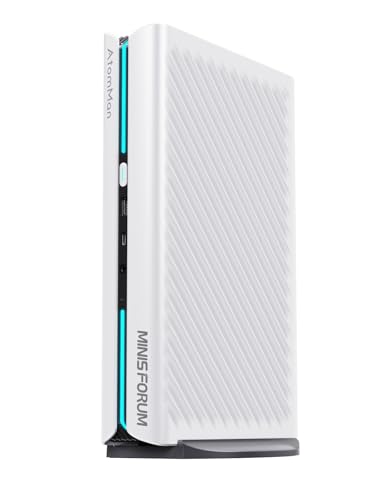
The MINISFORUM G1 Pro blends power with ultra-compact dimensions. It uses an AMD Ryzen 9 8945HX processor (16 cores, 32 threads) with a boost up to 5.4GHz and includes a dedicated GeForce RTX 5060 GPU for strong 1080p–4K gaming performance. It comes with 32GB DDR5 memory and a 1TB PCIe 4.0 SSD, plus multiple GPU-friendly outputs. Best for users who need desktop-like performance in a small footprint for tasks such as multi-monitor workstations, streaming, and creative workloads.
- Best for: small desks, digital signage, content creators who need strong CPU/GPU in a compact form factor.
- Better for: users needing four-monitor setups via 2x HDMI and 3x DisplayPort for extended workflows.
- Caution: Real-time ray tracing and DLSS features depend on software support and game compatibility.
Cooler Master NR2 Pro Gaming PC – 9800X3D Build
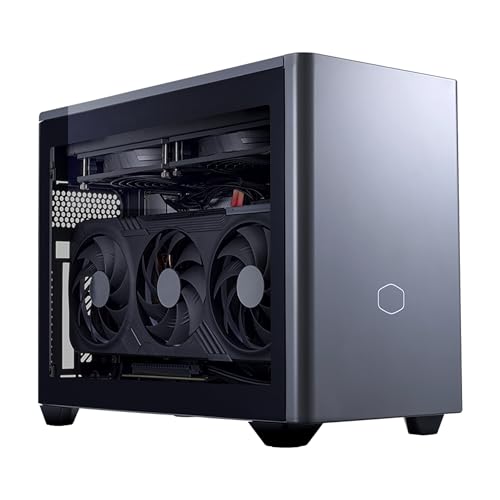
This variant targets compact ITX builds with a Ryzen 7 9800X3D and RTX 5070 Ti. The NR2 Pro uses a small 18.25L chassis with a 280mm AIO cooler and an 850W 80+ Gold PSU to sustain high clock speeds while keeping thermals in check. Best for gamers who want near-desktop performance in a compact box and frequent high-frame-rate gaming at 1440p. The 2TB Gen4 SSD provides ample fast storage for titles and media.
- Best for: compact rooms or gaming in a small desk footprint with strong 1440p performance.
- Better for: users who prioritize GPU headroom and fast storage in an ITX package.
- Caution: Limited internal expansion compared to mid-tower designs.
Cooler Master NR2 Pro Gaming PC – Ryzen 7 7800X3D Edition

This NR2 Pro model pairs a Ryzen 7 7800X3D with a RTX 5070 12GB in a compact 18.25L ITX chassis. It ships with 32GB DDR5 memory and 2TB Gen4 NVMe storage, offering solid 1440p gaming and content creation headroom within a small footprint. Best for gamers who want a balanced ITX build for multitasking and streaming while keeping the system quiet and cool.
- Best for: users needing a compact PC that handles modern titles at high settings.
- Better for: those who value a robust cooling solution and memory/storage capacity in ITX form.
- Caution: GPU performance can be sensitive to thermals in the smallest chassis if airflow is restricted.
Cooler Master NR2 Pro Gaming PC – Intel Ultra 7 Edition

This variant centers on the Intel Ultra 7 265F with an RTX 5080 in a compact ITX chassis. It also features 32GB DDR5 and a 2TB Gen4 SSD, delivering strong 1440p/4K potential in a space-saving build. Best for users who want Intel’s architecture in a small form factor with cutting-edge GPU performance for gaming and creative tasks.
- Best for: compact desktop users who prefer Intel platforms and top-end RTX GPUs.
- Better for: those prioritizing raw GPU power in a tiny footprint.
- Caution: The high-end GPU can run hot in tighter ITX enclosures without adequate airflow.
Alienware Aurora Gaming Desktop — RTX 5070

Alienware Aurora combines a modern chassis with a GeForce RTX 5070 and Intel Ultra processor. The design emphasizes aesthetics and expandability, with AlienFX lighting zones and efficient thermal management. Best for gamers who value brand ecosystems, easy upgrade paths, and a premium look without sacrificing performance.
- Best for: fans of the Alienware family and visually striking setups.
- Better for: users who want a polished, extensible platform with stylish lighting.
- Caution: High-end aesthetics may come at a premium price and limited internal space for upgrades.
KOTIN Gaming PC Desktop — Ryzen 7 8700F

KOTIN offers a practical gaming rig with Ryzen 7 8700F and RTX 5060 Ti 8GB. The build uses 16GB DDR5 RAM and a 1TB Gen4 SSD, focusing on solid 1080p–1440p performance with decent multitasking capacity. Best for budget-conscious gamers who still want reliable frame rates and a straightforward upgrade path in a compact tower.
- Best for: compact, value-oriented gaming PC with decent future-proofing.
- Better for: users who prioritize a balance of price, performance, and upgradeability.
- Caution: 16GB RAM may be a bottleneck in very memory-heavy titles or multitasking-heavy workloads.
Buying Guide: Key Considerations For SFF Gaming PCs
- Size vs. performance: In small form factors, check the GPU length, cooling capacity, and PSU wattage to ensure sustained performance without thermal throttling.
- GPU and CPU balance: Look for a system with a capable CPU that won’t bottleneck a strong GPU in your preferred games or workloads.
- Thermals and acoustics: ITX and compact designs often run hotter and louder under load; prioritize systems with adequate airflow and quality cooling.
- Upgradeability: Some SFF builds reduce internal expansion options. Consider future RAM, storage, and PCIe slot availability.
- Display and connectivity: Ensure the GPU and I/O include enough HDMI/DisplayPort outputs and fast networking (Ethernet/Wi‑Fi 6/7) for multi-monitor setups and streaming.
- Software ecosystem: Some vendors offer managed software, lighting controls, or convenience features that can help streamline setup.
Frequently Asked Questions
- What is an SFF gaming PC? A compact desktop designed to deliver desktop-class gaming performance in a smaller chassis or ITX/Mini-ITX form factor.
- Do SFF PCs handle 1440p gaming? Yes, many SFF systems pair strong CPUs with capable GPUs to provide solid 1440p performance, depending on the title and settings.
- Are ITX builds upgradeable? Many are, but internal space is tighter. Check available PCIe slots, RAM slots, and cooling options before upgrading.
- Is airflow more important in SFF builds? Yes. Efficient cooling and clean cable management help maintain performance and reduce noise.
- Should I choose Intel or AMD for an SFF gaming PC? Both offer strong options; AMD often provides higher core counts at similar prices, while Intel may excel in some single-threaded tasks. Your choice depends on preferred software compatibility and budget.
- Are there benefits to a premium brand in SFF builds? Premium brands often emphasize aesthetics, cooling, and upgrade paths, which can improve longevity and user experience in compact spaces.